How to Write a LinkedIn Headline That Gets You Noticed (2026 Guide)
Learn how to write a LinkedIn headline that increases profile views by 30%. Includes formulas, examples by profession, and the exact character limits you need to know.

Shanjai Raj
Founder at Postking
80% of LinkedIn users never update their headline from the platform's default.
That default? Just your job title and company name. It tells recruiters nothing about your value, skills, or what makes you different from thousands of others with the same title.
Here's what that costs you: LinkedIn profiles with optimized headlines receive 30-40% more profile views. When 87% of recruiters use LinkedIn to source candidates, your headline is often the difference between getting found and getting ignored.
This guide shows you exactly how to write a headline that works. Character limits, proven formulas, examples by profession, and the mistakes that kill your visibility.
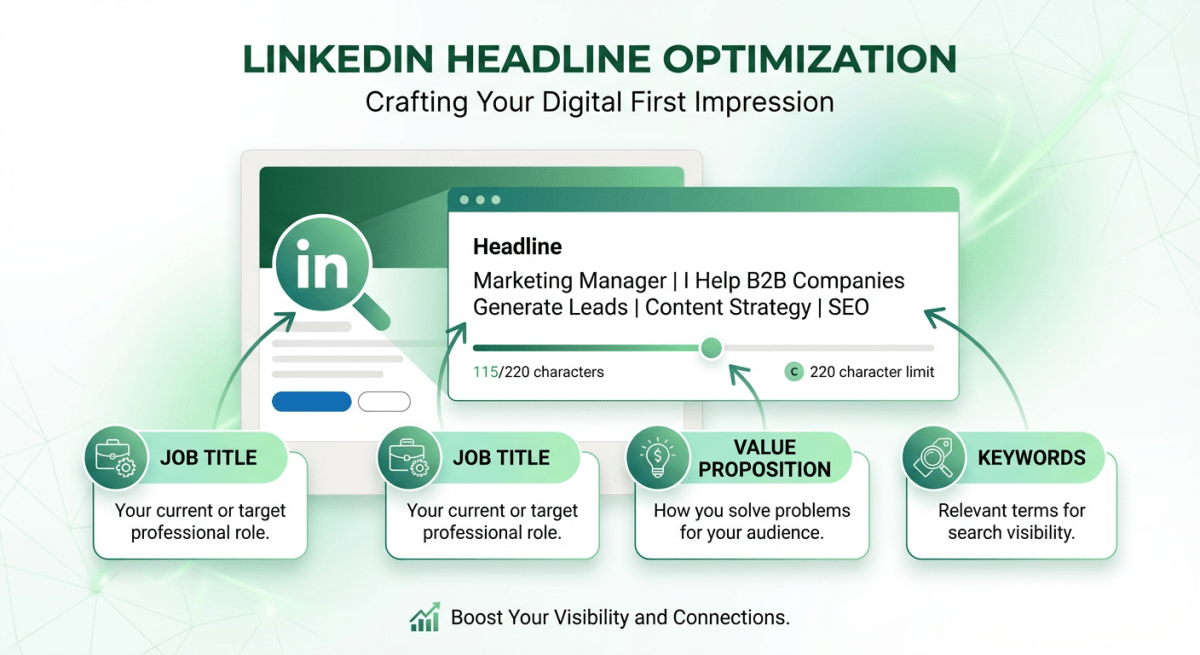 LinkedIn Headline Anatomy
Why Your Headline Matters More Than You Think
Your headline appears everywhere on LinkedIn:
- Search results
- Connection requests
- Comments you leave
- Content you post
- "People also viewed" sections
It's the most visible piece of your profile. In a survey by LinkedIn expert Bob McIntosh, 46% of respondents said the headline was more important than the Experience section (30%) and the About section (24%).
LinkedIn's algorithm also gives extra weight to your headline when matching profiles to recruiter searches. The keywords you include directly affect whether you show up when someone searches for professionals in your field.
Recruiters spend just 7.4 seconds scanning a profile. Your headline is often all they read before deciding to click or scroll past.
The Technical Specs
Character Limit: 220 characters (desktop and mobile)
Optimal Length: 120-220 characters
Critical Zone: First 100 characters
Why does the first 100 matter? That's what displays in most search results and notifications. Front-load your most important keywords and value proposition.
What to use for separators:
- Pipes:
| - Bullets:
• - Dashes:
- - Commas:
,
Avoid using too many emojis. One or two maximum. They can make your profile look unprofessional in certain industries.
5 Headline Formulas That Work
Formula 1: The Value Proposition
I help [Target Audience] [Achieve Specific Result] through [Your Method]
This formula works because it immediately tells people what you can do for them. It's audience-focused, not ego-focused.
Examples:
- "I help B2B startups generate inbound leads with SEO-focused content"
- "I help sales teams close more deals by enabling personalized outreach at scale"
- "I help manufacturers become more efficient through process engineering"
Use this formula if you're a consultant, freelancer, founder, or anyone who needs to attract clients.
Formula 2: The Keyword Stack
[Job Title] | [Skill 1] | [Skill 2] | [Skill 3] | [Achievement or Value]
This formula maximizes searchability. Recruiters search by keywords, and this format packs in as many relevant terms as possible.
Examples:
- "Digital Marketer | PPC, SEM, Facebook Ads | Google Ads Certified | Helped Scale Lead Gen from $50K to $500K"
- "Full-Stack Developer | React, Node.js, AWS | Built Products Used by 1M+ Users"
- "Data Analyst | SQL, Python, Tableau | Turning Complex Data into Business Decisions"
Use this formula if you're job seeking or want to be found for specific skills.
Formula 3: The Title + Context
[Job Title] at [Company] | [What You Actually Do] | [Differentiator]
This adds personality to a standard title. It tells people what you really do beyond the generic title.
Examples:
- "Content Marketing Manager at HubSpot | Building the Blog That Gets 7M Monthly Visitors"
- "Product Designer at Figma | Making Design Tools That Designers Actually Love"
- "Account Executive at Salesforce | Helping Mid-Market Companies Streamline Their Sales Process"
Use this formula if you're employed and want to stand out while representing your company.
Formula 4: The Outcome Focus
[Your Role/Title] | Helping [Audience] achieve [Specific Outcome]
Similar to Formula 1, but leads with your title for recognition and searchability.
Examples:
- "Leadership Coach | Helping New Managers Build High-Performing Teams"
- "Financial Advisor | Helping Families Build Generational Wealth"
- "Career Coach | Helping Mid-Career Professionals Land $150K+ Roles"
Use this formula if your title is recognizable but you want to emphasize results.
Formula 5: The Authority Builder
[Title] | [Notable Achievement/Credential] | [Area of Expertise]
This formula leads with proof. It works when you have credentials or achievements worth highlighting.
Examples:
- "CHRO | Built Teams from 50 to 500+ | Organizational Development & Talent Strategy"
- "Marketing Consultant | $10M+ Revenue Generated for Clients | B2B SaaS Growth"
- "Software Engineer | Ex-Google, Ex-Meta | Building AI-Powered Products"
Use this formula if you have impressive credentials or measurable achievements.
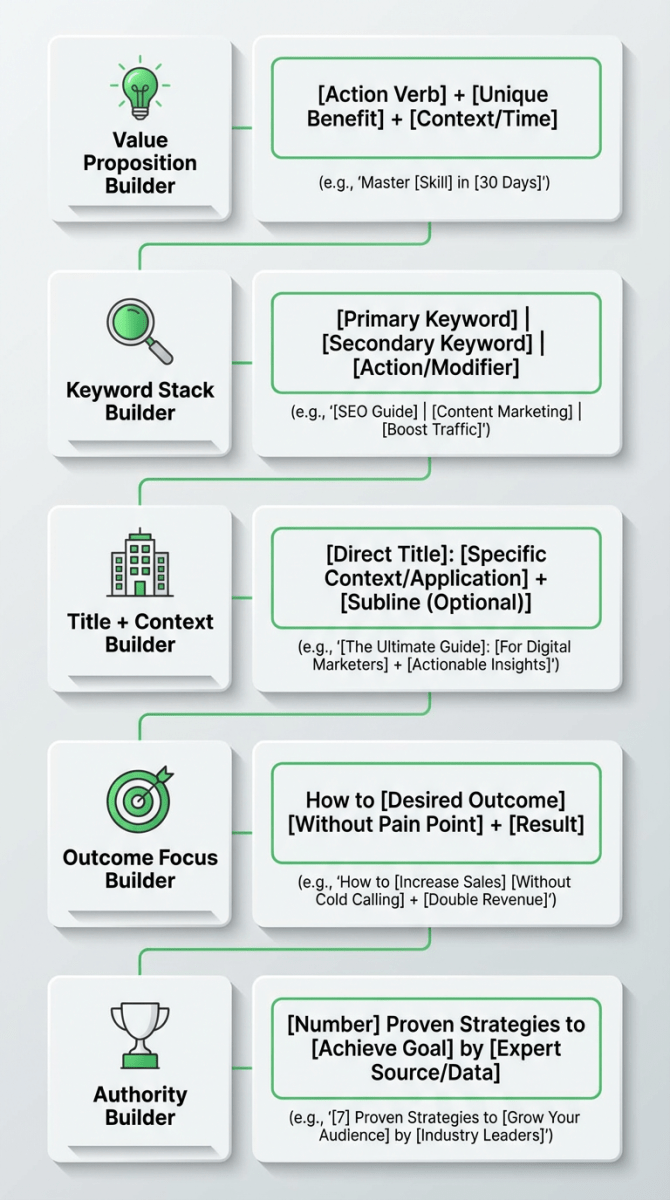 5 LinkedIn Headline Formulas
Headlines by Profession
For Job Seekers
Don't write: "Seeking New Opportunities" or "Open to Work"
Do write: Lead with value, add "Open to [Role Type]" at the end if needed.
- "Digital Marketing Manager | SEO, Content Strategy, Paid Social | Open to Marketing Leadership Roles"
- "Full-Stack Developer | React, Python, AWS | Shipped Products at 3 YC Startups | Exploring New Opportunities"
- "Operations Manager | Process Optimization & Team Leadership | 8+ Years in Logistics | Open to Senior Ops Roles"
The key: Lead with what you offer, not what you need.
For Sales Professionals
- "Enterprise Account Executive | Helping CFOs Automate Workflows to Close 7-Figure Deals"
- "Sales Development Rep at [Company] | Connecting Tech Leaders with Solutions That Scale"
- "VP of Sales | Built $0 to $20M ARR Sales Teams | B2B SaaS"
For Marketing Professionals
- "Content Strategist | Creating Content That Ranks, Converts, and Builds Brands"
- "Growth Marketing Manager | Scaled Startups from Seed to Series B Through Paid + Organic"
- "Brand Strategist | Helping Startups Find Their Voice and Stand Out"
For Engineers and Developers
- "Senior Software Engineer | Python, Go, Kubernetes | Building Scalable Backend Systems"
- "Frontend Developer | React, TypeScript, Next.js | Creating Fast, Accessible Web Apps"
- "DevOps Engineer | AWS, Terraform, CI/CD | Reducing Deploy Times from Days to Minutes"
For Consultants and Freelancers
- "Brand Consultant | Helping Startups Build Memorable Brands That Drive Growth"
- "Freelance Copywriter | Sales Pages, Email Sequences, and Landing Pages That Convert"
- "Business Strategy Consultant | Helping CEOs Navigate Growth from $1M to $10M"
For Executives
- "CEO | Scaling Tech Companies from Startup to Exit | 3 Successful Exits"
- "CMO | Building Marketing Engines That Drive Predictable Revenue Growth"
- "CTO | Transforming Engineering Teams into High-Velocity Product Organizations"
Common Headline Mistakes
Mistake 1: Using Only Your Job Title
"Marketing Manager" tells recruiters nothing. Thousands of people have that title. Add context, skills, or a value proposition.
Mistake 2: Buzzword Overload
"Visionary Thought Leader | Innovation Guru | Passionate Changemaker" says nothing concrete. Replace buzzwords with specific skills and outcomes.
Mistake 3: Being Too Vague
"Helping businesses grow" could mean anything. Who do you help? How do you help them? What results do you deliver?
Mistake 4: Keyword Stuffing
"SEO | SEM | PPC | CRO | CRM | B2B | B2C | ROI | KPI" is unreadable. Pick your top 3-4 most relevant keywords.
Mistake 5: Negativity or Desperation
"Desperately Seeking Employment" or "Laid Off and Looking" hurts your positioning. Lead with value, not circumstances.
Mistake 6: Outdated Information
"Student at [University]" when you graduated 5 years ago. "Intern at [Company]" when you're now a manager. Keep it current.
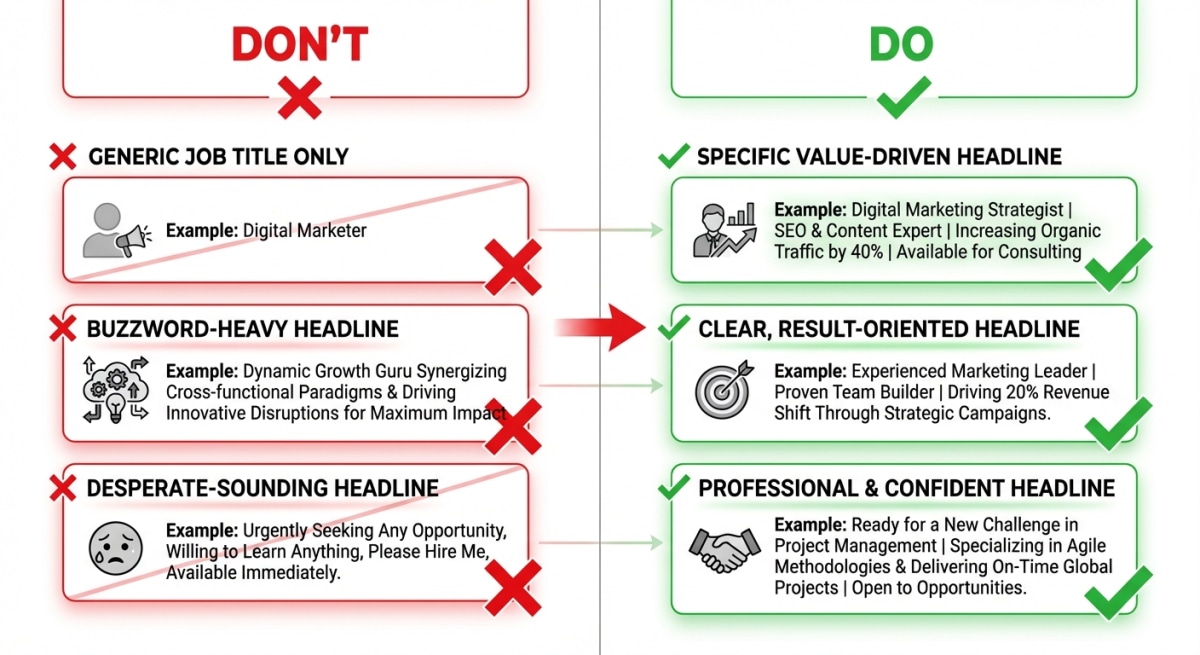 Common LinkedIn Headline Mistakes
How to Find Your Keywords
Your headline should include keywords recruiters actually search for. Here's how to find them:
Step 1: Look at Job Postings
Find 5-10 job postings for roles you want. Note the skills, titles, and tools mentioned repeatedly. These are your keywords.
Step 2: Check Competitor Profiles
Look at people in your field with strong profiles. What keywords appear in their headlines? What terms do they use?
Step 3: Use LinkedIn's Search
Start typing in LinkedIn's search bar. The autocomplete suggestions show you what people actually search for.
Step 4: Prioritize Specific Over Generic
"Mobile Application Developer" is more searchable than "Tech Professional." "Content Marketing Manager" beats "Marketing Person."
Writing Your Headline: Step by Step
Step 1: Define Your Audience
Who do you want to find you? Recruiters? Potential clients? Partners? Your headline should speak to them.
Step 2: List Your Top 3-4 Keywords
What skills or titles should trigger your profile in search results?
Step 3: Identify Your Differentiator
What makes you different from others with the same title? An achievement? A specialty? A unique approach?
Step 4: Pick a Formula
Choose one of the five formulas above that fits your situation.
Step 5: Write 3 Versions
Don't stop at one. Write at least three variations and compare them.
Step 6: Check the Character Count
Make sure you're under 220 characters. Front-load the important stuff in the first 100.
Step 7: Read It Out Loud
Does it sound natural? Would you say it to someone at a networking event?
Test and Iterate
Your headline isn't permanent. LinkedIn shows you weekly profile views in your analytics.
Track this number. Change your headline, wait 2-3 weeks, and see if views increase.
Some things to test:
- Leading with your title vs. leading with value
- Including vs. excluding specific company names
- Different keyword combinations
- Adding vs. removing credentials
Small changes can have significant impact. The only way to know what works for your audience is to test.
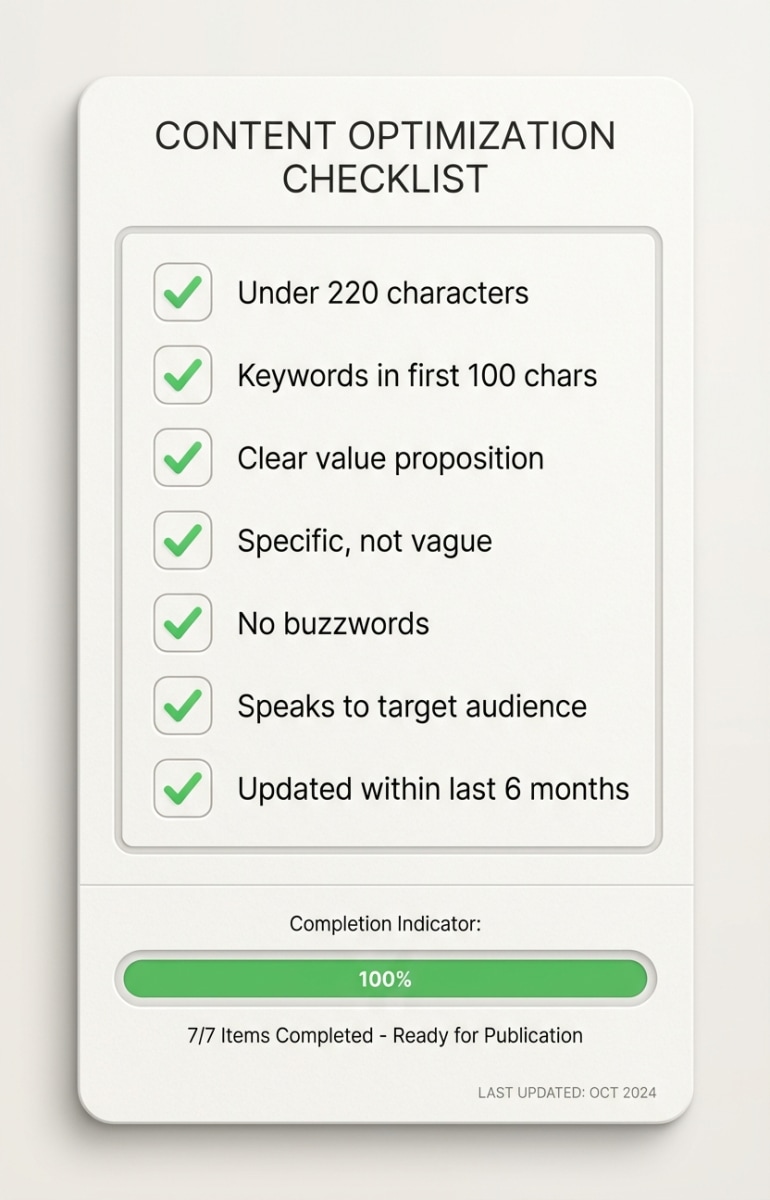 LinkedIn Headline Checklist
Start Today
Your headline is free to change and takes two minutes to update. There's no reason not to optimize it right now.
Here's your action plan:
- Open your LinkedIn profile
- Look at your current headline
- Pick one formula from this guide
- Write a new headline using the formula
- Update it and track your profile views for the next two weeks
Need help formatting your LinkedIn content? Postking's free post formatter helps you structure posts that perform. Write once, format perfectly, post with confidence.
A strong headline won't guarantee you get the job or the client. But it will get you seen. And getting seen is the first step to every opportunity on LinkedIn.
Related Reads
Written by
Shanjai Raj
Founder at Postking
Building tools to help professionals grow on LinkedIn. Passionate about content strategy and personal branding.
View all postsYou might also like
LinkedIn Headline Generator
Try our free linkedin headline generator to enhance your LinkedIn presence.
LinkedIn About Section Generator
Try our free linkedin about section generator to enhance your LinkedIn presence.
LinkedIn Profile Optimization: The Complete Guide for 2026
Learn how to optimize your LinkedIn profile to get 40x more opportunities. Covers photo, headline, about section, experience, skills, and the exact specs that matter.
LinkedIn Profile Optimization for Consultants: Convert Profile Views Into Discovery Calls
Learn how consultants should optimize their LinkedIn profiles differently than job seekers. Includes conversion-focused strategies for every profile section, how to showcase results without breaking confidentiality, and strategic CTA placement to turn visitors into paying clients.
LinkedIn First Post Generator
Try our free linkedin first post generator to enhance your LinkedIn presence.
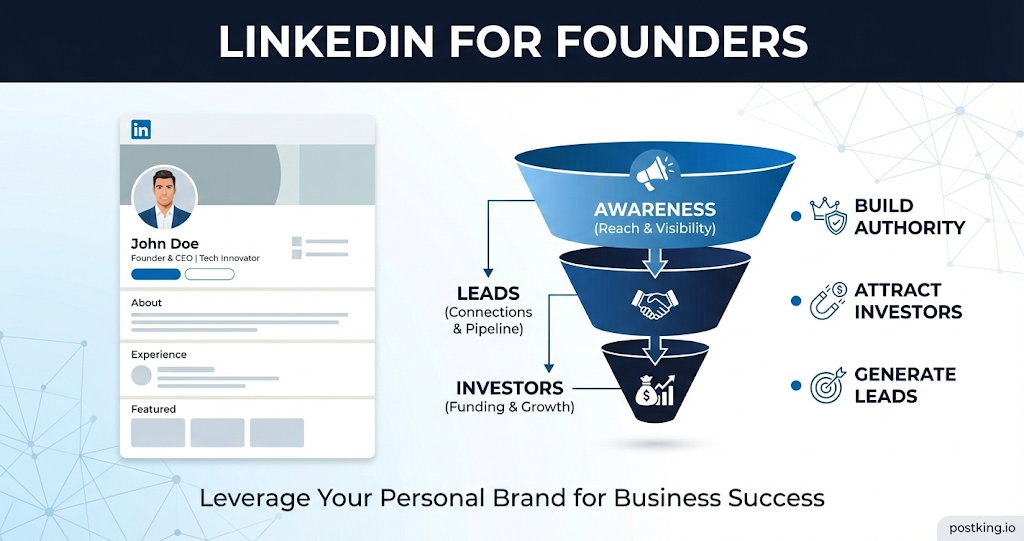
LinkedIn Growth Strategy for Founders (2026 Guide)
A complete LinkedIn growth playbook for founders to build authority, attract investors, and grow pipeline.
LinkedIn Client Acquisition for Coaches and Consultants (2026)
A client-focused LinkedIn strategy for coaches and consultants. Build authority, attract high-ticket clients, and convert profile views into calls.
more engagement with carousels
Create scroll-stopping LinkedIn carousels in under 60 seconds. No design skills needed.
Try Carousel Generator