LinkedIn Profile Optimization: The Complete Guide for 2026
Learn how to optimize your LinkedIn profile to get 40x more opportunities. Covers photo, headline, about section, experience, skills, and the exact specs that matter.

Shanjai Raj
Founder at Postking
61 million people search LinkedIn every week. Profiles that are fully optimized get 40x more opportunities than incomplete ones.
That's not a typo. LinkedIn's own data shows that "All-Star" profiles (their term for 100% complete) receive dramatically more views, messages, and connection requests.
Yet most profiles are half-finished. Generic headlines. Empty About sections. Experience lists that read like job descriptions instead of achievement records.
This guide walks through every section of your LinkedIn profile, with exact specs, best practices, and the specific changes that move the needle on visibility.
Profile Photo: 14x More Views
Your photo is the first thing people notice. LinkedIn profiles with photos receive 14x more profile views than those without. You're also 36x more likely to receive a message if you have a headshot.
Photo Specifications
- Size: 400x400 pixels minimum, up to 7680x4320 pixels maximum
- File format: JPEG or PNG
- Maximum file size: 8MB
- Face coverage: Your face should fill approximately 60% of the frame
What Makes a Good Photo
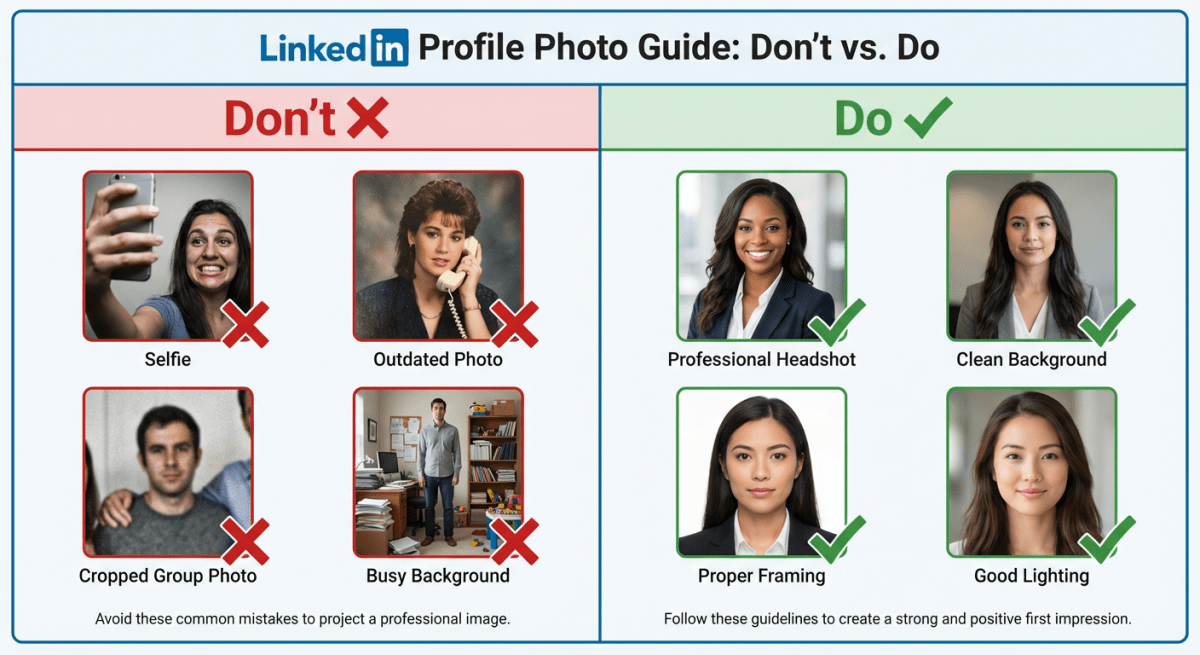
Do:
- Use a recent photo (within the past 2-3 years)
- Wear what you'd wear to a job interview in your industry
- Use a simple, uncluttered background
- Make sure lighting is even and flattering
- Smile or use a confident, approachable expression
Don't:
- Use selfies or cropped group photos
- Include other people in the frame
- Use outdated photos that don't look like you
- Choose distracting or busy backgrounds
- Use heavy filters
Smile or serious? Research shows smiles increase perceptions of warmth, while serious expressions boost perceptions of competence. Match your expression to your industry and goals.
Cost: Professional photographers charge $200-$400 for headshots. If budget is tight, a smartphone camera in good natural light works fine.
 Profile Photo Best Practices
Banner Image: Your Billboard
The banner (background image) is prime real estate that most people leave as LinkedIn's default blue gradient. It's a missed opportunity.
Banner Specifications
- Size: 1584 x 396 pixels (4:1 aspect ratio)
- Minimum: 1192 x 220 pixels
- File format: JPEG, PNG, or GIF
- Maximum file size: 8MB
Design Considerations
Your profile photo sits in the lower-left corner of the banner. Keep important content in the center and right side to avoid overlap.
Safe zone: Don't place critical text or images in the bottom 100 pixels or the left third of the image.
What to include:
- Your value proposition or tagline
- Your company logo (if employed)
- Contact information or website URL
- Visual representation of your work
- Industry-relevant imagery
Keep it simple. Busy banners overwhelm visitors. One clear message or image works better than cramming in multiple elements.
Test on mobile. Banners display differently on phones and tablets. Preview yours across devices before finalizing.
Headline: 30% More Views
We covered headlines in depth in our LinkedIn headline guide, but here's the summary:
- Character limit: 220 characters
- Optimal length: 120-220 characters
- Key zone: First 100 characters (what shows in search results)
Profiles with optimized headlines receive 30% more views. The headline also influences LinkedIn's search algorithm, determining whether you appear when recruiters search for specific skills.
Formula that works: [Role] | [Who You Help] | [How You Help Them] | [Key Skills]
Example: "Marketing Manager | Helping B2B SaaS Companies Scale Through Content | SEO, Demand Gen, Analytics"
About Section: Your Digital Elevator Pitch
The About section (formerly Summary) has a 2,600 character limit. It's one of the most important sections for SEO and first impressions.
LinkedIn uses your About section in its search algorithm. Keywords here directly affect whether your profile appears in relevant searches.
50% of buyers avoid sales reps with incomplete LinkedIn profiles. An empty About section signals you're not serious about your professional presence.
Structure That Works
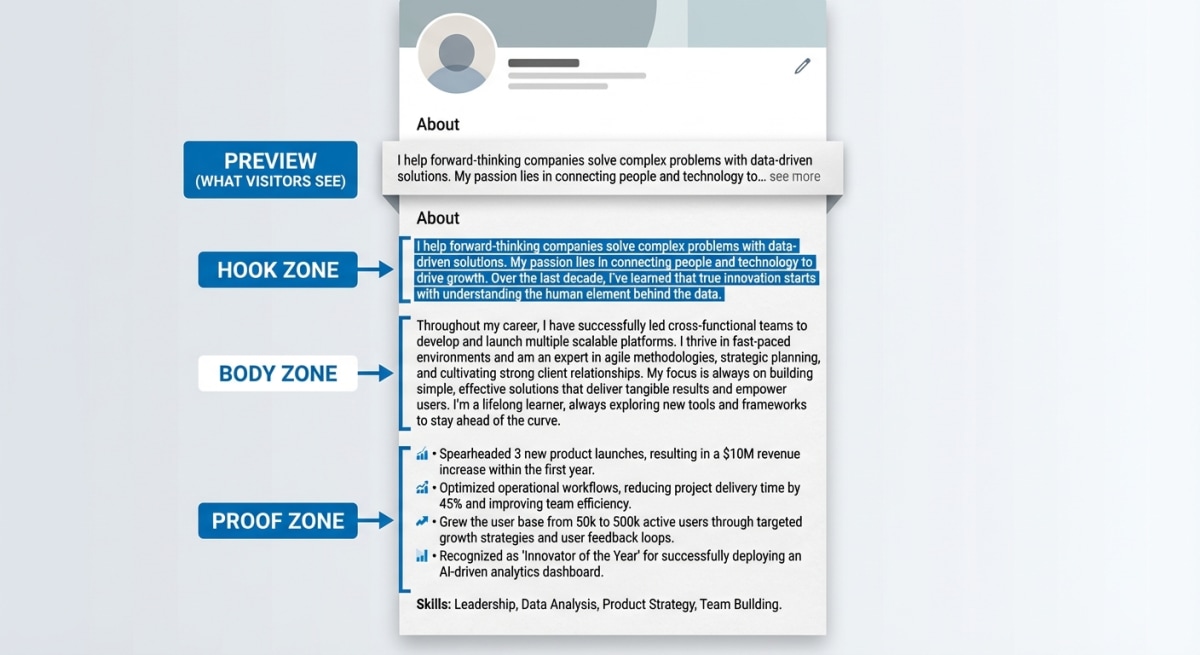
Opening hook (First 2-3 lines): This is what shows before "see more." Make it count. State what you do and who you help, or lead with an accomplishment.
Body (Middle section): Cover your expertise, approach, and what makes you different. Use short paragraphs (2-3 sentences max) for readability.
Proof points: Include 3-5 bullet points with specific achievements, metrics, or highlights.
Call to action (End): Tell readers what to do next. Connect? Message? Visit your website?
Writing Tips
Be conversational. The About section is a conversation starter, not a formal biography. Write like you're explaining what you do to someone at a networking event.
Use keywords naturally. Include the terms recruiters search for, but don't stuff them awkwardly. "I specialize in Python, machine learning, and data pipeline architecture" reads better than "Python | ML | Data Pipelines."
Connect the dots. If your career path looks non-linear, explain it. Frame pivots as advantages.
First person is fine. "I help companies..." reads more naturally than "John helps companies..."
 About Section Structure
Experience Section: Beyond Job Descriptions
Your Experience section shouldn't be a copy-paste of your resume. LinkedIn is public and searchable, which changes how you should present information.
Best Practices
3-5 bullet points per role. Focus on accomplishments, not just responsibilities.
Lead with impact. Start bullets with action verbs: "Increased," "Built," "Launched," "Reduced," "Generated."
Quantify results. "Increased revenue by 40%" beats "Responsible for revenue growth." Numbers catch recruiter attention.
First 4 lines matter most. LinkedIn truncates long descriptions. Put your best achievements first.
Add media. You can attach documents, images, links, and presentations to each role. A portfolio piece or case study makes you stand out.
Example Bullet Points
Weak: "Managed social media accounts and created content."
Strong: "Grew LinkedIn following from 5K to 50K in 12 months through consistent content strategy, generating 500+ qualified leads."
Weak: "Responsible for sales in the Northeast region."
Strong: "Exceeded quota by 125% ($2.1M) in first year, ranking #2 of 45 reps nationally."
Weak: "Worked on product development projects."
Strong: "Led development of mobile app feature used by 100K+ daily active users, reducing user drop-off by 35%."
Skills Section: 17x More Views
LinkedIn members with 5+ skills listed receive 17x more profile views from recruiters and are contacted 33x more often.
Skills are a primary search filter for LinkedIn Recruiter, the tool companies pay for to find candidates. Without relevant skills listed, you're invisible to these searches.
How Many Skills to Add
LinkedIn allows up to 50 skills. You don't need to max it out, but having fewer than 5 hurts your visibility.
Recommended: 15-25 skills, with your most important ones pinned to the top 3 positions.
Endorsements
Target for core skills: 99+ endorsements signals expertise.
You don't need this for every skill. Focus on getting endorsements for your top 3-5 most relevant abilities.
How to get endorsements:
- Endorse others first (many reciprocate)
- Ask colleagues and clients directly
- Make sure your skills list is accurate (people can only endorse what's listed)
Skills Assessments
LinkedIn offers free assessments for many skills. Passing one adds a "Verified" badge to that skill, making you stand out in recruiter searches.
Take assessments for your core technical skills if available. The badge provides instant credibility.
Featured Section: Show Your Work
The Featured section lets you pin content to your profile. Use it to showcase:
- Your best LinkedIn posts
- Published articles
- Website links
- External media (podcasts, videos, press mentions)
- Case studies or portfolio pieces
Why it matters: Featured content appears near the top of your profile. It lets you control what visitors see and demonstrates expertise beyond just text descriptions.
What to feature:
- Your highest-performing LinkedIn post
- A link to your website or portfolio
- A piece of content that showcases your expertise
- Media that demonstrates your work
Recommendations: Social Proof
Recommendations are written testimonials from colleagues, managers, or clients. They provide credibility that you can't create yourself.
How many: 3-5 strong recommendations is a good target. Quality matters more than quantity.
How to get them:
- Give recommendations first (many people reciprocate)
- Ask people you've worked closely with
- Be specific in your request ("Could you speak to my project management skills on the X project?")
Pro tip: Recommendations should come from diverse sources—former managers, peers, direct reports, clients—to show you work well with different stakeholders.
Custom URL: Looks Professional
By default, LinkedIn gives you a URL like linkedin.com/in/john-smith-8a3b4c5d. You can customize this.
How to change it: Settings → Edit public profile → Edit URL
Best practice: Use your name. linkedin.com/in/johnsmith or linkedin.com/in/john-smith looks cleaner and is easier to share.
If your name is taken, add your middle initial, industry, or location: linkedin.com/in/johnsmith-marketing
Creator Mode: Optional Boost
Creator Mode changes your profile layout to emphasize content. It replaces "Connect" with "Follow" as the primary button.
Who should use it: People focused on building audience and publishing content regularly.
Who shouldn't: Job seekers (you want people to connect, not follow) or people who don't post often.
What it enables: Access to LinkedIn Live, newsletters, and analytics. Also adds hashtag topics to your profile.
The All-Star Profile Checklist
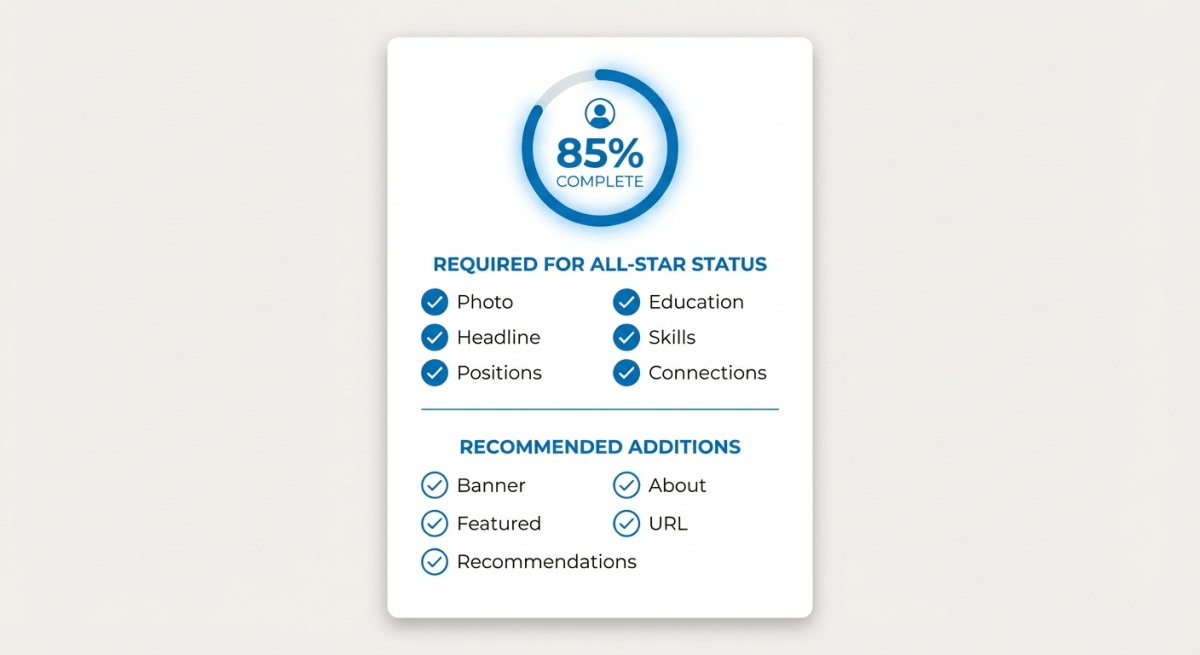
LinkedIn assigns a "Profile Strength" indicator. Reaching "All-Star" status (100% complete) means you're 40x more likely to receive opportunities.
Required elements:
- Profile photo
- Headline (customized, not default)
- Industry selected
- Location added
- Current position with description
- Two past positions
- Education
- At least 5 skills
- 50+ connections
Highly recommended:
- Custom banner image
- Detailed About section
- Featured content
- Recommendations (given and received)
- Custom URL
 LinkedIn Profile Checklist
Maintenance: Keep It Fresh
Profiles that are updated regularly rank higher in LinkedIn's algorithm. Set a reminder to review your profile quarterly.
Quarterly review:
- Update headline if your focus has shifted
- Add new skills you've developed
- Update experience with recent achievements
- Remove outdated or irrelevant content
- Check that all links still work
After major changes:
- New job? Update everything immediately
- New certification? Add it within a week
- Published something? Add it to Featured
Start Optimizing
Profile optimization isn't a one-time task. It's ongoing maintenance that keeps you visible and relevant.
This week, focus on:
- Update your photo if it's more than 3 years old
- Rewrite your headline using a proven formula
- Fill in your About section if it's empty
- Add 5+ relevant skills
Building content to post on your optimized profile? Postking's free carousel generator helps you create professional carousels that get 3x more engagement than text posts.
An optimized profile won't guarantee you get hired or land clients. But it puts you in front of the right people when they're searching. And on a platform where 61 million people search every week, being findable is half the battle.
Related Reads
Written by
Shanjai Raj
Founder at Postking
Building tools to help professionals grow on LinkedIn. Passionate about content strategy and personal branding.
View all postsYou might also like
LinkedIn Headline Generator
Try our free linkedin headline generator to enhance your LinkedIn presence.
LinkedIn About Section Generator
Try our free linkedin about section generator to enhance your LinkedIn presence.
How to Write a LinkedIn Headline That Gets You Noticed (2026 Guide)
Learn how to write a LinkedIn headline that increases profile views by 30%. Includes formulas, examples by profession, and the exact character limits you need to know.
LinkedIn Profile Optimization for Recruiters: 12-Point Checklist (2026)
Optimize your LinkedIn profile to get found by recruiters. Complete 12-point checklist with examples, templates, and recruiter insights. 2-hour implementation.
LinkedIn First Post Generator
Try our free linkedin first post generator to enhance your LinkedIn presence.
LinkedIn Profile Optimization for Consultants: Convert Profile Views Into Discovery Calls
Learn how consultants should optimize their LinkedIn profiles differently than job seekers. Includes conversion-focused strategies for every profile section, how to showcase results without breaking confidentiality, and strategic CTA placement to turn visitors into paying clients.
How to Explain Career Gaps on LinkedIn: Turn Your Pause Into a Strength (2026)
Career gap on your resume? Learn how to address employment gaps on LinkedIn with confidence. 15+ templates, strategic placement tips, and proven frameworks for layoffs, parenting, health, travel, and more.
more engagement with carousels
Create scroll-stopping LinkedIn carousels in under 60 seconds. No design skills needed.
Try Carousel Generator