How to Get More Engagement on LinkedIn in 2026 (Data-Backed Strategies)
Learn proven strategies to boost LinkedIn engagement. Covers the algorithm changes, hook formulas, content formats, and the first-hour tactics that actually work.

Shanjai Raj
Founder at Postking
70% of LinkedIn users never engage with posts. They scroll past without a single like, comment, or share.
That means your competition for attention is fierce. But it also means that posts which do get engagement stand out dramatically.
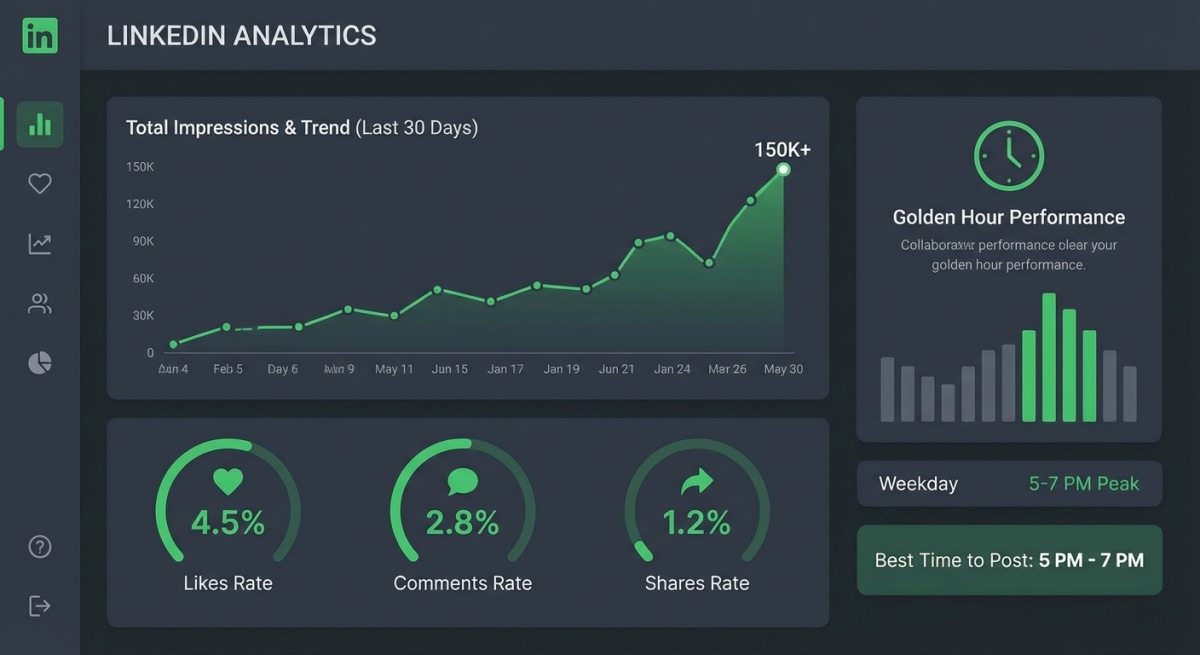
LinkedIn engagement increased by 44% year-over-year according to recent data, with average engagement rates now sitting at 3.85%. The platform is more active than ever. The question is: are your posts capturing that engagement?
This guide breaks down exactly how LinkedIn's algorithm works in 2026, the content formats that perform best, and the specific tactics that turn passive scrollers into active engagers.
 LinkedIn Engagement Overview
How the LinkedIn Algorithm Actually Works
Understanding the algorithm isn't optional. It determines whether 100 people see your post or 100,000.
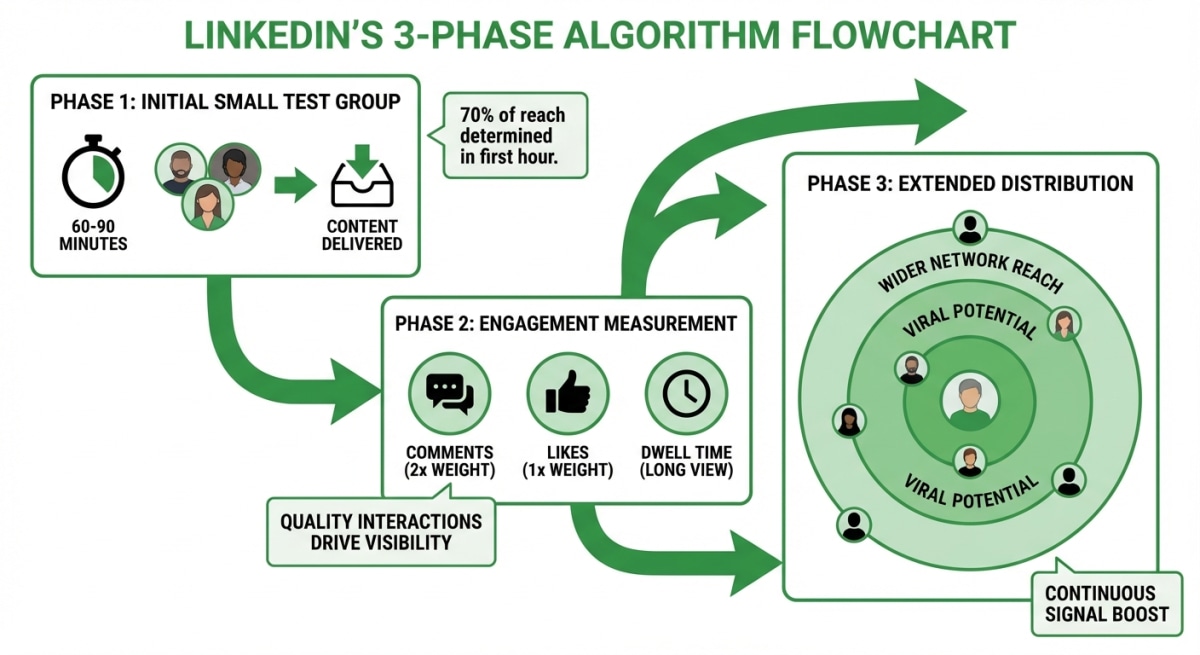
The Three-Phase Distribution System
Phase 1: Initial Test (First 60-90 minutes)
LinkedIn shows your post to a small group—typically your most engaged connections and followers. This is your "test audience."
Phase 2: Engagement Scoring (1-2 hours)
The algorithm measures how your test audience responds. Different actions carry different weights:
- Comments: Count 2x as much as likes
- Shares: High value signal
- Saves: Strong interest indicator
- Dwell time: How long people spend reading
- Click-through: If people expand to read more
Phase 3: Extended Distribution (2+ hours)
Based on your Phase 1 and 2 scores, LinkedIn decides whether to show your post to second and third-degree connections. High-performing posts keep spreading. Low-performing posts stop.
The critical insight: The first 60-90 minutes determine 70% of your post's ultimate reach. This is called the "golden hour."
The Dwell Time Factor
Dwell time has become the #1 ranking factor in LinkedIn's algorithm. It measures how long someone spends reading or engaging with your content.
A post that gets scrolled past in 2 seconds signals low value. A post that holds attention for 30+ seconds signals high value.
What this means for you:
- Write content worth reading completely
- Use formatting that keeps eyes on the page
- Create carousels (average dwell time: 2-3 minutes vs. 15-30 seconds for text)
- Avoid clickbait that doesn't deliver
Algorithm Changes in 2026
LinkedIn made significant changes this year:
- Organic reach down 50% compared to previous years
- AI-generated content gets 30% less reach and 55% less engagement
- Engagement bait ("Comment YES if you agree!") is now penalized
- External links reduce reach—put links in comments instead
- Native formats (carousels, text posts, video) perform 1.9x better than link posts
 LinkedIn Algorithm Explained
Content Formats: What Works Best
Not all content formats perform equally. Here's what the data shows:
Engagement Rates by Format (2026)
| Format | Average Engagement Rate |
|---|---|
| Multi-image posts | 6.60% |
| Native documents (carousels) | 5.85% |
| Video | 5.60% |
| Text-only posts | 4.20% |
| Link posts | 2.80% |
Multi-image posts and carousels dominate because they increase dwell time. Each swipe or image view keeps the reader engaged longer, signaling value to the algorithm.
Video performs well, but with a caveat: videos under 15 seconds get significantly more engagement than longer videos. The platform favors short, punchy content.
Link posts perform worst because LinkedIn wants to keep users on the platform. If you need to share a link, put it in the first comment instead of the main post.
Carousel-Specific Performance
Carousels get 24.42% engagement rate compared to 6.67% for text posts. That's nearly 4x higher.
Why carousels work:
- Each swipe is a micro-commitment
- Dwell time of 2-3 minutes vs. 15-30 seconds for text
- Visual content is easier to consume
- Structure creates clear value delivery
Optimal carousel length: 8-10 slides. Enough to deliver value. Not so long that people drop off.
Writing Hooks That Stop the Scroll
Your first line determines whether anyone reads the rest. Data shows a strong opening line can boost reader retention by up to 30%.
The Anatomy of a Good Hook
Maximum length: Keep hooks under 200 characters. Two lines max, one line ideal.
What hooks do: Create tension, curiosity, or promise specific value.
What hooks don't do: Explain context, introduce yourself, or warm up slowly.
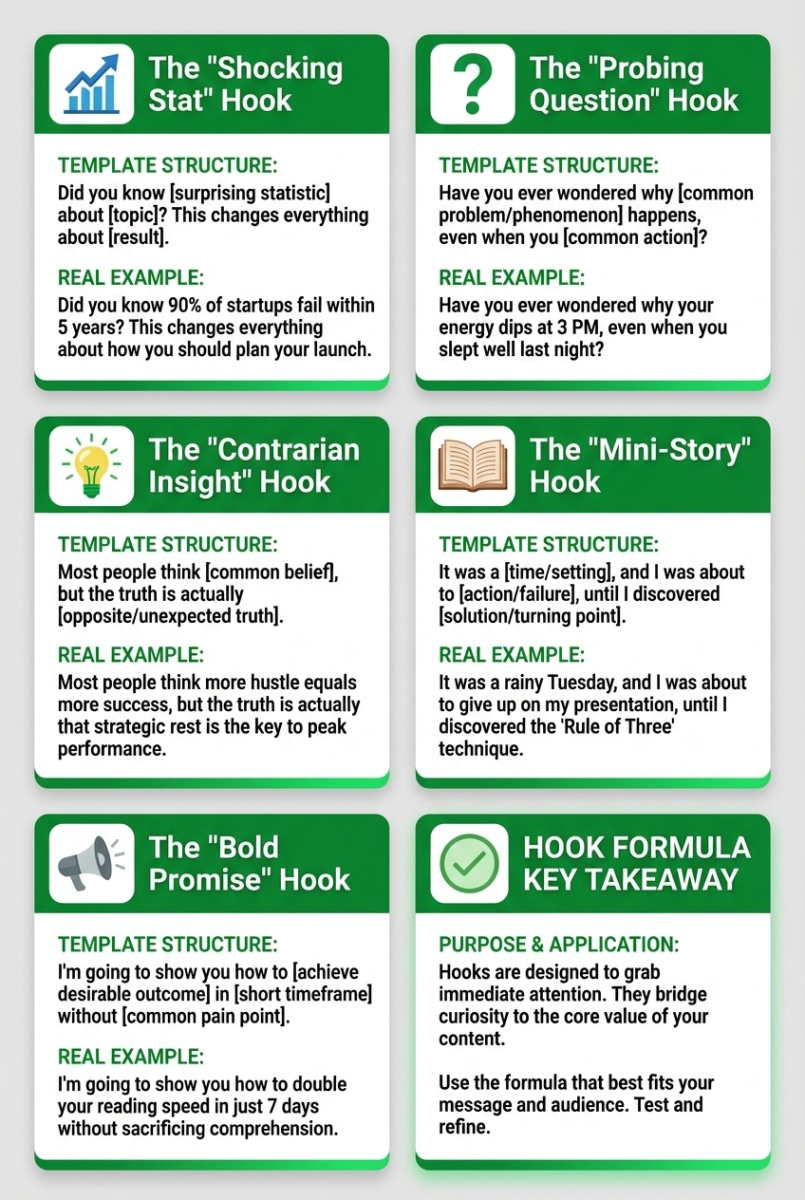
Hook Formulas That Work
Formula 1: The Surprising Statistic
"80% of LinkedIn profiles never get updated." "Posts at 8 AM get 2x more engagement than posts at 2 PM."
Numbers stop the scroll because they're specific and concrete.
Formula 2: The Counterintuitive Statement
"Stop trying to grow your LinkedIn following." "The best posts don't get many likes."
This creates cognitive friction. Readers want to understand why you're contradicting common wisdom.
Formula 3: The Personal Story Entry
"I lost $50K before I learned this lesson." "Last Tuesday, I almost quit."
Stories create immediate emotional investment. People want to know what happened.
Formula 4: The Direct Question
"Why do your posts get ignored?" "What's the one thing holding back your LinkedIn growth?"
Questions activate the brain differently than statements. Readers start thinking about their own answer.
Formula 5: The Bold Claim
"This one change 3x'd my engagement." "The only LinkedIn strategy that matters in 2026."
Bold claims demand proof. Readers keep scrolling to see if you deliver.
Hook Examples That Performed
Before: "Let's talk about sales funnels." (3% expand rate)
After: "I wasted $10K on ads before I learned this." (12% expand rate)
Same topic. Same audience. 4x difference in engagement because of the hook.
 Hook Formula Examples
The Golden Hour Strategy
The first 60-90 minutes after posting determine 70% of your reach. Here's how to maximize this window:
Before You Post
1. Know your audience's timezone
If most of your audience is on the US East Coast, posting at 8 AM ET means they're online. Posting at 8 AM PT means you're hitting them at 11 AM—past the morning scroll window.
2. Choose optimal posting times
- Best days: Tuesday, Wednesday, Thursday
- Best times: 7-8 AM, 12 PM, 5-6 PM (in your audience's timezone)
- Worst times: Weekends, late nights
3. Have your response plan ready
Know that you'll need to be active for 30 minutes after posting.
During the Golden Hour
1. Respond to every comment immediately
When someone comments, reply within minutes. This:
- Doubles the comment count (your reply counts too)
- Creates a conversation thread
- Signals to the algorithm that your post is generating discussion
- Encourages the commenter to come back
2. Ask follow-up questions
Don't just reply "Thanks!" Ask a question that continues the conversation.
Weak response: "Thanks for your thoughts!"
Strong response: "Thanks! Have you found that works in your industry too? Curious what results you've seen."
3. Engage with others
While monitoring your post, like and comment on 2-3 other posts in your feed. This activity signals to LinkedIn that you're an active user, which helps your post's visibility.
The 30-Minute Rule
Your first 30 minutes of engagement matter more than the next 23.5 hours combined.
Plan to be fully present during this window. Don't post and walk into a meeting. Don't post before going to sleep.
Formatting for Maximum Engagement
LinkedIn's algorithm rewards posts that are easy to read and keep people scrolling.
Whitespace Wins
Bad:

Here's what I learned about engagement on LinkedIn. First you need to understand the algorithm. Then you need to write great hooks. After that focus on formatting. Finally, engage with your audience.

Good:
Here's what I learned about engagement on LinkedIn:

First, understand the algorithm.

Then write great hooks.

After that, focus on formatting.

Finally, engage with your audience.
Short paragraphs (1-3 sentences max) are easier to scan. One idea per line.
Use Visual Breaks
- Bullet points break up walls of text
- Numbered lists signal clear steps
- Emojis can work as visual anchors (but don't overuse)
- Bold text highlights key points
Optimal Post Length
Data shows 1,200-1,500 characters performs best for text posts. Long enough to deliver value. Short enough to not lose attention.
For posts that need more space, use the carousel format instead.
The Commenting Strategy
Comments drive more engagement than any other tactic. The algorithm weights comments 2x higher than likes.
Commenting on Others' Posts
Thoughtful comments on relevant posts in your industry:
- Get you seen by that creator's audience
- Build relationships with industry peers
- Create reciprocity (they're more likely to engage with your posts)
- Establish your expertise
What makes a good comment:
- Adds to the conversation (not just "Great post!")
- Shares relevant experience or perspective
- Asks a thoughtful follow-up question
- Is at least 2-3 sentences long
What to avoid:
- Generic comments ("Interesting!" "So true!")
- Spam or self-promotion
- Controversial takes just for attention
- Tagging people who aren't relevant
Encouraging Comments on Your Posts
Ask specific questions. "What do you think?" is weak. "What's been your biggest challenge with LinkedIn engagement?" is specific and answerable.
Create stakes. "Comment your answer and I'll share my take" gives people a reason to respond.
Be slightly controversial. Posts with clear positions generate more discussion than bland observations.
Make it easy. "Comment 'hook' and I'll send you my template" gives people a low-effort way to engage.
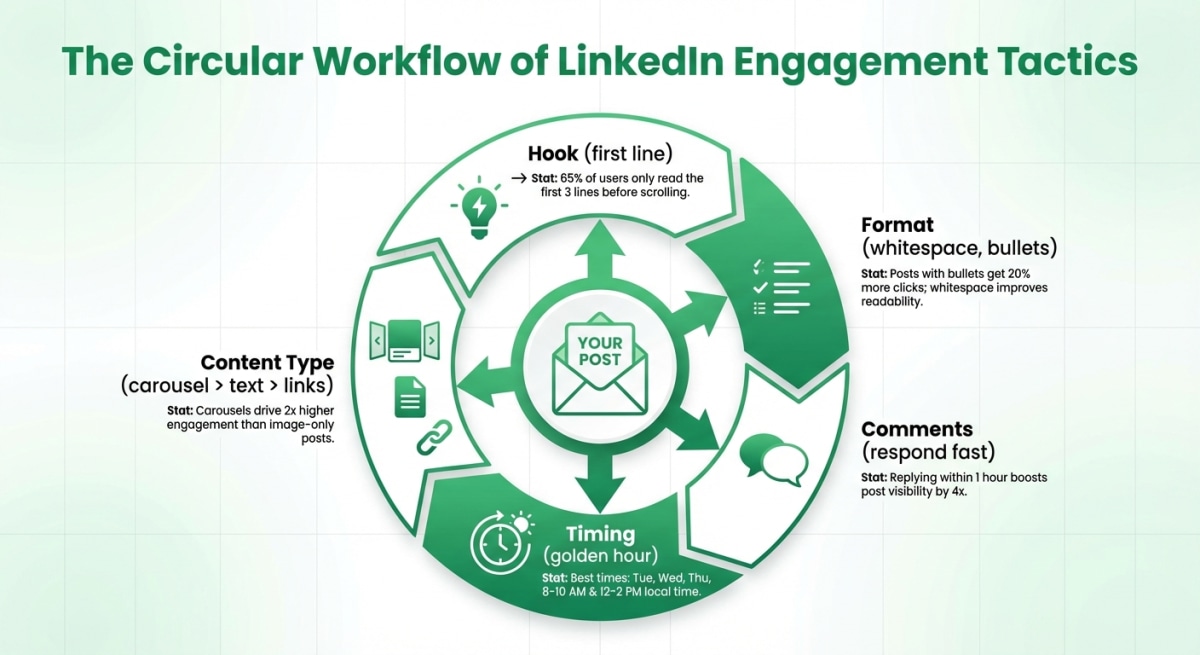 Engagement Tactics Overview
Hashtag Strategy
Hashtags help LinkedIn categorize your content and show it to people interested in those topics.
How Many Hashtags
Optimal: 3-5 hashtags per post.
More than 5 can trigger spam filters. Fewer than 3 limits discovery.
Types to Mix
Broad hashtags (500K+ followers): #marketing, #leadership, #sales
- Bigger potential reach, more competition
Niche hashtags (10K-100K followers): #contentmarketing, #b2bsales, #linkedintips
- Smaller but more targeted reach
Use a mix of both. 1-2 broad + 2-3 niche works well.
Placement
Put hashtags at the end of your post or in the first comment. Both work. In the post is slightly better for algorithm pickup.
Tracking Your Performance
You can't improve what you don't measure.
Key Metrics to Track
Engagement rate: (Likes + Comments + Shares) / Impressions
- Good: 3-4%
- Great: 5%+
- Excellent: 8%+
Comment-to-like ratio: Higher ratio = more meaningful engagement
Expand rate: How many people click "see more" on long posts
Follower growth: Track weekly, not daily
What to Test
- Posting times: Same content, different times
- Hook styles: Statistics vs. questions vs. stories
- Content formats: Text vs. carousel vs. video
- Post length: Short vs. long
- Topics: What resonates with your audience
Run tests for 2-3 weeks before drawing conclusions. Single posts don't tell you much.
Common Engagement Killers
Posting and disappearing: If you're not present in the first hour, your post dies.
External links in the main post: Put them in comments. LinkedIn penalizes link posts.
Engagement bait: "Like if you agree!" LinkedIn actively demotes these.
AI-generated content without editing: LinkedIn detects it. AI-generated posts get 30% less reach.
Inconsistent posting: The algorithm rewards consistency. Sporadic posting hurts your baseline reach.
Ignoring comments: Not responding signals you don't care about engagement.
Wrong timing: Posting at 11 PM when your audience is asleep.
Your Engagement Action Plan
Engagement isn't about hacks. It's about consistently doing the right things.
This week:
-
Audit your recent posts - Check engagement rates. Identify what worked and what didn't.
-
Pick your posting times - Choose 2-3 slots based on when your audience is active.
-
Write 3 hook variations - For your next post, write multiple opening lines. Pick the most compelling one.
-
Block your calendar - Schedule 30 minutes after each post to respond to comments.
-
Start commenting - Leave 5 thoughtful comments per day on relevant posts in your industry.
Need help creating content that gets engagement? Postking's free carousel generator helps you build carousels that get 3x more engagement than text posts. Write your content, pick a template, export ready-to-post slides.
Engagement compounds over time. The algorithm learns who regularly creates valuable content. It learns who responds to comments. It learns who contributes to conversations.
Build those habits now, and your reach grows with each post.
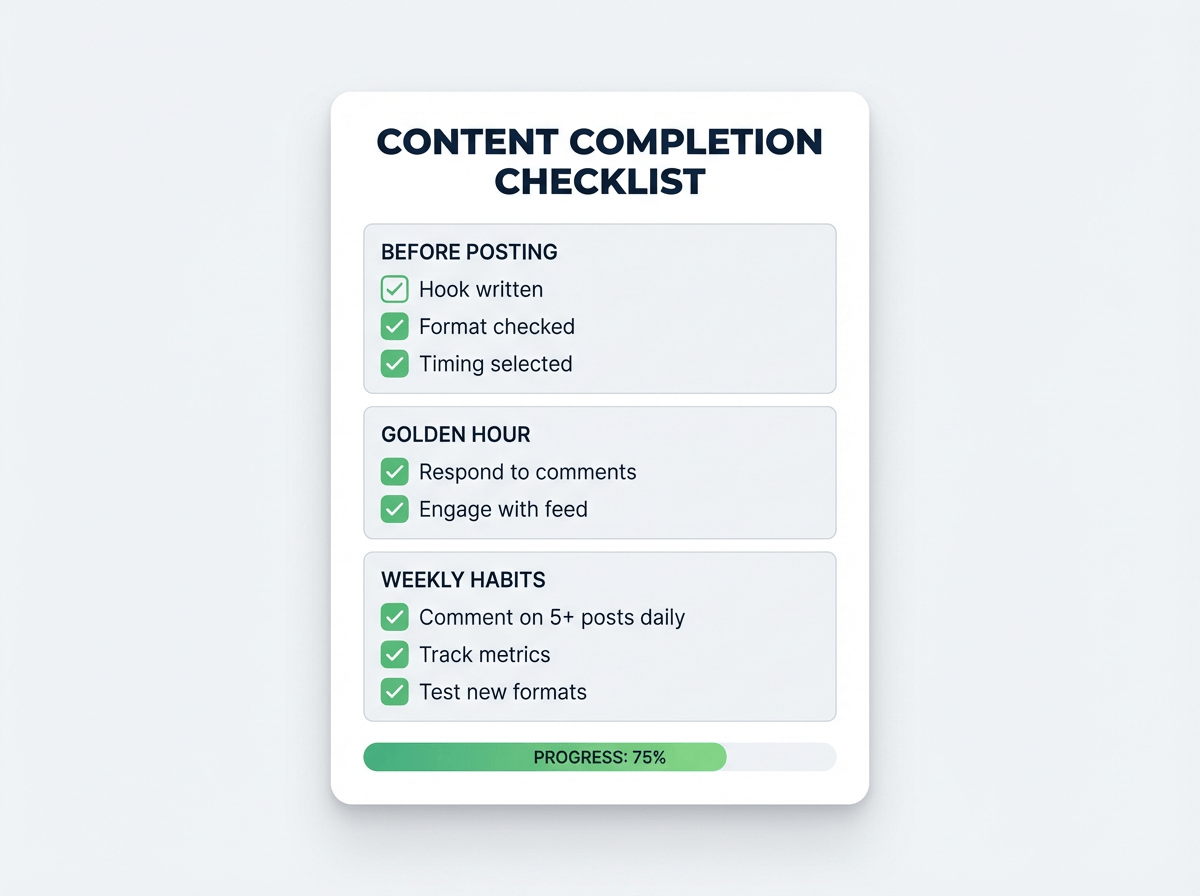 LinkedIn Engagement Checklist
Related Reads
Written by
Shanjai Raj
Founder at Postking
Building tools to help professionals grow on LinkedIn. Passionate about content strategy and personal branding.
View all postsYou might also like
LinkedIn Hook Generator
Try our free linkedin hook generator to enhance your LinkedIn presence.
LinkedIn Hook Grader
Try our free linkedin hook grader to enhance your LinkedIn presence.
How to Format LinkedIn Posts for Maximum Readability (Data-Backed Guide)
Learn the exact formatting techniques that get LinkedIn posts 3x more engagement. Includes character limits, hook formulas, white space strategy, and the see-more cutoff most creators miss.
How to Create LinkedIn Carousels That Actually Get Engagement
Learn exactly how to create LinkedIn carousels that get 24% engagement rates. Includes hook formulas, design specs, content frameworks, and the Rehook technique most creators miss.
LinkedIn Post Ideas Generator
Try our free linkedin post ideas generator to enhance your LinkedIn presence.
Best Time to Post on LinkedIn in 2026 (Data-Backed Guide)
Discover the best times and days to post on LinkedIn for maximum reach. Includes time zone strategies, industry-specific timing, and how to find your optimal posting schedule.
more engagement with carousels
Create scroll-stopping LinkedIn carousels in under 60 seconds. No design skills needed.
Try Carousel Generator