LinkedIn Prospecting Workflow for SDRs: Daily Schedule Template (2026)
Time-blocked daily prospecting workflow used by top 10% SDRs. Activity targets, scripts, tools, and KPIs for systematic LinkedIn outreach.

Shanjai Raj
Founder at Postking
Real Pain from r/sales
"I'm putting in 10 hour days on LinkedIn but only booking 2-3 meetings a week. My manager says I need to be more 'systematic' but won't tell me what that actually means. I feel like I'm just randomly sending messages all day with no real structure. How do top SDRs actually organize their prospecting workflow?"
Your calendar is wide open. Your CRM is empty. Your inbox has zero replies to the 47 LinkedIn messages you sent yesterday.
You're busy all day - sending connection requests, writing messages, checking for replies - but your activity feels random. You're reactive instead of strategic. Some days you send 100 connection requests. Other days you barely hit 20. There's no system.
Here's the reality: Top-performing SDRs aren't just working hard. They're working systematically.
They have a time-blocked daily workflow that ensures they hit specific activity targets, use the right tools at the right time, and track the metrics that actually predict pipeline. Their days are structured for maximum output with minimum burnout.
In this guide, you'll get:
- ✅ Exact time-blocked daily schedule used by quota-crushing SDRs (8:00am-5:00pm breakdown)
- ✅ Activity targets for each time block (connections, messages, engagements)
- ✅ Specific tools to use during each block (with alternatives)
- ✅ Word-for-word scripts and templates for every activity
- ✅ KPIs to track daily, weekly, and monthly (with benchmarks)
- ✅ Weekly review process to scale what works
- ✅ Burnout prevention strategies that actually work
- ✅ Free tools to write better hooks and format posts (Post Formatter and Hook Generator)
Let's build your systematic prospecting machine.
Table of Contents
- Why Structure Matters for SDRs
- The Problem with Random Prospecting
- The Daily Workflow Framework
- 8:00-10:30am: Golden Hours Outreach
- 11:00am-12:00pm: Content Engagement
- 2:00-4:00pm: Multi-Channel Follow-Up
- 4:30-5:00pm: Metrics Review & Next Day Prep
- Activity Targets & Benchmarks
- Weekly Review Process
- Scaling What Works
- Avoiding Burnout
- FAQ
Why Structure Matters for SDRs
The average SDR spends 6.5 hours per day on "prospecting activities" but only 21% of that time on actual high-value selling activities (Salesforce, 2024). The rest? Random busy work that feels productive but doesn't move the needle.
The data on structured workflows:
- SDRs with time-blocked schedules book 38% more meetings than those who "wing it"
- Consistent daily activity targets reduce burnout rates by 43%
- Top 10% performers spend 70% of their time on just 3 activities (vs. bottom 50% who spread time across 8+ activities)
What's at stake for you:
- ❌ Without structure: You'll waste 4-5 hours daily on low-value tasks, experience feast-or-famine pipeline (great weeks followed by terrible weeks), and burn out from inconsistent, reactive work patterns
- ✅ With structure: You'll hit consistent activity targets that predict pipeline, know exactly what to work on at any given hour, and maintain sustainable performance without burning out
The difference between hitting 70% of quota and 120% of quota isn't talent. It's systematic execution.
The Problem with Random Prospecting
Most SDRs approach each day reactively:
Monday morning: Send 100 connection requests because you feel motivated
Monday afternoon: Respond to a few messages, browse LinkedIn aimlessly
Tuesday: Manager asks for pipeline update, panic and send 50 generic pitch messages
Wednesday: Spend 3 hours researching one huge account that will never close
Thursday: Realize you haven't hit activity metrics, spam 80 connection requests in 2 hours
Friday: Exhausted, do minimal prospecting, promise yourself you'll "get organized next week"
The problems with this approach:
Problem 1: Inconsistent Activity = Unpredictable Pipeline
Your pipeline looks like a rollercoaster. Great weeks are followed by terrible weeks because you don't have consistent daily inputs.
Reality: B2B sales cycles are 3-6 months. The connections you make today become meetings in 3 weeks and deals in 3 months. Random activity today = random pipeline forever.
Problem 2: No Prioritization = Wasted Hours
You spend equal time on every activity: research, connection requests, messaging, content engagement, email follow-up. But not all activities have equal ROI.
Reality: 80% of your meetings will come from 20% of your activities. If you don't know which 20%, you're wasting 80% of your time.
Problem 3: No Metrics = No Improvement
You track activities ("sent 50 messages today") but not outcomes ("what was my response rate?"). You don't know what's working or what to double down on.
Reality: SDRs who track conversion metrics (acceptance rate %, response rate %, meeting-booked rate) improve 3x faster than those who only track activities.
Problem 4: Always "On" = Fast Track to Burnout
You check LinkedIn every 30 minutes, respond to messages at 9pm, and feel guilty when you're not prospecting. There are no boundaries.
Reality: 57% of SDRs report burnout due to unrealistic expectations and poor time management (Gartner). The solution isn't working more hours - it's working more systematically.
Time to fix this.
The Daily Workflow Framework
Here's the mental model that changes everything:
Principle 1: Time Block for Energy Management
Different prospecting activities require different energy levels. Match high-energy tasks (personalized outreach) to high-energy times (mornings). Match low-energy tasks (CRM updates) to low-energy times (late afternoons).
Application: Schedule your hardest, highest-value work (hyper-personalized connection requests and messaging) during your peak energy hours (typically 8am-11am).
Principle 2: Batch Similar Tasks
Context switching kills productivity. Writing 20 personalized connection requests in one 90-minute block is 2x faster than spreading them throughout the day.
Application: Group similar activities together. Do all connection requests in one block, all message follow-ups in another block, all content engagement in another.
Principle 3: Lead Measures Over Lag Measures
You can't control how many meetings you book today (lag measure). You can control how many high-quality connection requests you send (lead measure).
Application: Focus on daily activity targets that predict future pipeline: connections sent, messages sent, engagement actions. The meetings will follow.
Principle 4: Protect Your Calendar
Your prospecting time is your most valuable asset. Treat it like a client meeting - non-negotiable, blocked on calendar, no internal meetings allowed.
Application: Block 8am-12pm daily as "Do Not Schedule - Prospecting Time." Train your manager and team to respect these blocks.
Now let's build your daily workflow.
8:00-10:30am: Golden Hours Outreach
Duration: 2.5 hours Energy Required: High (this is your most important block) Tools: LinkedIn, Apollo.io, Sales Navigator (or alternatives), CRM
Why These Hours Matter
B2B decision-makers are most active on LinkedIn 8am-12pm Tuesday-Thursday. Your connection requests sent during these hours see 22% higher acceptance rates than requests sent in the afternoon.
Plus, you're fresh. Your personalization quality is highest in the morning, which directly impacts your acceptance and response rates.
Activity Targets for This Block
Primary Activity: Hyper-Personalized Connection Requests
- Target: 25-30 connection requests sent
- Time per prospect: 5-7 minutes (research + personalized message)
- Expected acceptance rate: 45-50%
- Expected new connections: 11-15 per day
Secondary Activity: Message Follow-Ups
- Target: 15-20 messages sent to existing connections
- These are prospects in your sequences (touches 2-6)
- Time per message: 3-5 minutes
The Exact Workflow
8:00-8:15am: Warm-Up (15 minutes)
-
Check overnight notifications:
- New connection acceptances (prioritize these for Day 2 messages)
- Message replies (flag urgent responses)
- Profile views from target accounts (these are hot - reach out today)
-
Review today's target list:
- Open your pre-built list of 30 prospects (you built this yesterday at 4:30pm)
- Quickly scan for any breaking news about their companies (funding, product launches, leadership changes)
-
Mental prep:
- Review your connection request formulas
- Have your best-performing templates ready
- Get in the mindset: you're helping prospects, not bothering them
8:15-10:00am: Connection Request Blitz (1 hour 45 minutes)
For each prospect (5-7 minutes per prospect, 25-30 total):
Minutes 1-3: Research
- Scan their last 3 LinkedIn posts (find something to reference)
- Check company LinkedIn for recent news
- Look for mutual connections
- Note any shared interests or backgrounds
Minutes 4-5: Write Personalized Request
- Use one of your proven connection formulas (see templates below)
- Reference specific detail from your research
- Keep it under 200 characters
- Make it about them, not you
Minutes 6-7: Send + Log
- Send the request
- Log in CRM with note about personalization angle
- Tag for follow-up sequence
Example: Connection Request Template Library
Formula #1: The Content Curator (Best for active posters)

Hey [Name], your post about [specific topic] really resonated - especially the point about [detail]. Would love to connect and follow more of your insights on [industry/topic]!

Character count: 145-175 Acceptance rate: 48-52%
Formula #2: The Mutual Connection (Highest acceptance)
Hi [Name], I'm connected with [Mutual Name] from [context]. Saw you're doing interesting work in [specific area] at [Company]. Would love to connect!
Acceptance rate: 55-65%
Formula #3: The Company News
Hi [Name], saw [Company] just [announced X]. The focus on [specific angle] is interesting given [industry trend]. Would love to connect and learn more!
Acceptance rate: 42-48%
For complete connection request strategies, see our LinkedIn Lead Generation for Sales guide.
10:00-10:30am: Message Follow-Ups (30 minutes)
Send 15-20 messages to connections who are in your sequences:
Day 2 Messages (Connections accepted 48 hours ago):
Thanks for connecting, [Name]! Saw you're focused on [specific initiative]. We just published a report on [related topic] that might be helpful - thought you'd find the data on [specific insight] interesting: [link]

Either way, looking forward to your posts on [topic]!
Goal: Provide value, no ask Expected response rate: 15-20%
Day 7 Messages (Touch 3):
Hey [Name], quick question - what's your take on [recent industry trend]? I've been hearing mixed opinions from folks in [their role].

We're seeing [specific observation] but I imagine your perspective is different?
Goal: Start conversation about their challenges Expected response rate: 25-30%
Day 14 Messages (The Soft Ask):
Hey [Name], wanted to float something by you. We helped [Similar Company] [achieve specific outcome] by [approach]. Not sure if it's relevant to [their company], but happy to show you the framework in a quick 15-min call.

Would next Tuesday or Wednesday work?
Goal: First meeting request Expected conversion: 20-25% of engaged prospects
For complete messaging sequences, check our LinkedIn Lead Generation guide.
Tools for This Block
Primary Tools:
- LinkedIn (connection requests and messaging)
- Apollo.io ($0-59/month) - for prospect research and email finding
- CRM (Salesforce, HubSpot, or even Google Sheets) - for activity tracking
Chrome Extensions:
- Kaspr or Lusha ($0-30/month) - for finding email addresses and phone numbers
- LinkedIn Sales Navigator ($99/month) or alternatives
Pro Tip: Use LinkedIn on desktop, not mobile. Desktop allows faster research, easier copy-paste of templates, and better multi-tasking between LinkedIn and CRM.
11:00am-12:00pm: Content Engagement
Duration: 1 hour Energy Required: Medium Tools: LinkedIn, Hook Generator, Post Formatter
Why This Block Matters
This is where you build visibility and credibility without direct outreach. Every comment you leave on a prospect's post puts you in their notifications. Every post you publish builds authority that makes your connection requests more likely to be accepted.
The ROI: SDRs who engage with content 30 minutes daily see 31% higher connection acceptance rates and 23% higher response rates (because prospects recognize their names).
Activity Targets for This Block
11:00-11:30am: Strategic Engagement (30 minutes)
Target: Engage with 10-15 posts
- 5-8 posts from target prospects (your ICP)
- 3-5 posts from industry thought leaders (your prospects follow them too)
- 2-3 posts from existing connections (nurture relationships)
How to engage strategically:
-
Find the right posts:
- Use LinkedIn search: "content filter: posts, connections: 1st degree, keyword: [your industry]"
- Check your feed for posts from prospects
- Look for posts with 10-50 likes (early enough that your comment will be seen)
-
Leave meaningful comments (not "great post!"):
Bad comment:
"Great insights! Thanks for sharing!"
Good comment:
"The point about [specific detail] is spot on. We're seeing this exact challenge with [related context]. Curious if you've also noticed [related trend]?"
Why good comments work:
- Shows you actually read the post
- Adds value to the conversation
- Positions you as a peer, not a vendor
- Your comment appears in notifications of everyone who liked the post
Pro tip: Comment within first 60 minutes of someone posting. Early comments get more visibility as the post gains traction.
11:30am-12:00pm: Content Creation (30 minutes)
Target: Write and publish 1 LinkedIn post (3x per week: Tue/Wed/Thu)
The 80/20 Content Rule:
- 80% problem identification (challenges your ICP faces)
- 20% solution hints (not product pitches)
Example Post Structure:
[Attention-grabbing hook - use Hook Generator]

Here's what's actually happening:

1. [Problem observation with data]
2. [Unexpected insight or contrarian take]
3. [Consequence most people miss]

The SDRs who are winning in 2026?

They're doing [specific approach].

Here's the framework:
[Share tactical insight]

[Optional: Soft CTA to comment or DM]
Content Topics That Work:
- Common objections you hear and how you handle them
- Industry trends and what they mean for your ICP
- Mistakes you see prospects making
- Behind-the-scenes of your sales process (humanizes you)
- Frameworks and templates that provide value
Tools for this block:
- Hook Generator - Create scroll-stopping opening lines in 10 seconds
- Post Formatter - Format posts for maximum readability and engagement
Time-saving tip: Batch-write 3 posts on Friday afternoon (30 minutes per post = 90 minutes total). Schedule them for Tuesday 9am, Wednesday 12pm, Thursday 5pm. This frees up your daily content block for engagement only.
Why Content Compounds
Month 1: Posts get 10-20 likes, maybe 1-2 comments Month 2: Posts get 30-50 likes, 5-10 comments Month 3: Posts occasionally break 100 likes, prospects start reaching out Month 6: You get 5-10 inbound connection requests per week from your ICP
The engagement you do today builds the inbound pipeline of tomorrow.
2:00-4:00pm: Multi-Channel Follow-Up
Duration: 2 hours Energy Required: Medium Tools: Email, phone, LinkedIn, CRM
Why Multi-Channel Matters
LinkedIn-only outreach gets you 15-20% response rates. Multi-channel sequences (LinkedIn + Email + Phone) get you 35-45% response rates.
Your prospects aren't on LinkedIn all day. They're in Slack, email, on calls, in meetings. You need to surround them with consistent messaging across multiple channels.
Activity Targets for This Block
2:00-3:00pm: Email Follow-Up (1 hour)
Target: Send 20-25 emails to prospects who:
- Connected on LinkedIn but haven't responded to your messages
- Are in day 10+ of your sequence (time for different channel)
- Showed engagement (liked your content, viewed your profile) but didn't reply
Email Template #1: The Value-First Email
Subject: Quick question about [their company]'s [initiative]
Hi [Name],

I've been following [Company]'s moves in [specific area] - particularly [recent announcement].

We work with [similar companies] on [related challenge], and I'm seeing a common pattern:

[Problem observation] → [Negative outcome] → [Financial impact]

Curious if this resonates with what you're seeing?

Either way, I shared a [resource type] that might be useful: [link]

Best,
[Your name]
Email Template #2: The Multi-Channel Bridge
Subject: Following up from LinkedIn
Hi [Name],

We connected on LinkedIn a couple weeks ago. I sent you a message about [topic] but I know LinkedIn messages can get buried.

Quick question: Are you seeing [specific challenge] as you [their initiative/goal]?

We helped [Similar Company] solve this exact thing - happy to show you the framework. 15 minutes, your call whether it's worth exploring further.

Free next Tuesday or Wednesday?

[Your name]
3:00-3:45pm: Phone Calls (45 minutes)
Target: 10-15 calls to high-intent prospects
Who to call:
- Prospects who responded positively to LinkedIn/email but haven't booked a meeting
- Prospects who booked meetings that need confirmation
- Warm leads who engaged with your content multiple times
Voicemail Script:
"Hey [Name], [Your Name] here from [Company]. We've been chatting on LinkedIn about [topic]. I sent you a calendar link but wanted to make sure it didn't get buried in your inbox. I have something specific to show you related to [their challenge]. Give me a call back at [number] or just grab 15 minutes on my calendar: [link]. Talk soon!"
Live conversation framework:
-
Opener: "Hey [Name], [Your Name] from [Company] - we connected on LinkedIn a couple weeks ago. Do you have 2 minutes?"
-
Context reminder: "We were chatting about [specific topic/challenge they mentioned]."
-
Value proposition: "I wanted to show you the [framework/template/case study] we discussed - it's specific to [their situation]. Would 15 minutes this week work for a quick Zoom?"
-
Handle objection: If they say they're busy: "Totally understand. I can send you the framework via email and you can decide if it's worth 15 minutes. What email works best?"
3:45-4:00pm: CRM Hygiene (15 minutes)
- Log all emails sent
- Log all calls made (with notes)
- Update contact stages in CRM
- Flag hot leads for manager review
- Move cold prospects to "nurture" sequence
Multi-Channel Sequence Example
Here's how touches work across channels for one prospect:
| Day | Channel | Action | Goal |
|---|---|---|---|
| 1 | Personalized connection request | Get accepted | |
| 3 | Thank you + value resource | Provide value | |
| 5 | Related insight with different angle | Different channel | |
| 8 | Thoughtful question about their challenges | Start conversation | |
| 12 | Case study from similar company | Build credibility | |
| 15 | Soft meeting ask | Book meeting | |
| 18 | Phone | Follow-up call if no response | Direct contact |
| 21 | Break-up message | Permission-based close |
Multi-channel approach increases reply rates by 50% vs. single-channel.
4:30-5:00pm: Metrics Review & Next Day Prep
Duration: 30 minutes Energy Required: Low (perfect for end of day) Tools: CRM, Spreadsheet, Dashboard
Why This Block Is Critical
You can't improve what you don't measure. This 30-minute daily review is how top performers get 1% better every single day.
Activity Targets for This Block
4:30-4:45pm: Daily Metrics Update (15 minutes)
Track these metrics daily:
| Metric | Daily Target | How to Calculate |
|---|---|---|
| Connection Requests Sent | 25-30 | Count from LinkedIn/CRM |
| Connection Acceptance Rate | 45-50% | Acceptances ÷ Requests sent |
| Messages Sent (Follow-ups) | 15-20 | Count from LinkedIn |
| Message Response Rate | 20-30% | Responses ÷ Messages sent |
| Emails Sent | 20-25 | Count from email/CRM |
| Email Response Rate | 10-15% | Responses ÷ Emails sent |
| Calls Made | 10-15 | Count from CRM |
| Meetings Booked | 1-2 | Count from calendar |
| Content Engagements | 10-15 | Comments + likes left |
Update your dashboard: Use a simple Google Sheet or your CRM dashboard. Input today's numbers.
Identify patterns:
- Which connection request formula had the highest acceptance rate?
- Which message touch got the most responses?
- Which prospects engaged but didn't book? (These need nurturing)
- Which channels (LinkedIn vs. email vs. phone) drove the most conversations?
4:45-5:00pm: Next Day Prep (15 minutes)
Build tomorrow's target list:
- Identify 30 new prospects for connection requests
- Pre-research each: recent posts, company news, mutual connections
- Add to your "Tomorrow's Outreach" list in CRM or spreadsheet
- Pre-write any templates you'll need
Why this matters: You start tomorrow morning with a clear list and can jump straight into high-value work (personalized outreach) instead of spending 45 minutes figuring out who to target.
Weekly rollup (Fridays add 10 minutes):
- Calculate weekly averages for all metrics
- Compare to previous week
- Identify what to double down on next week
- Identify what to stop doing
The Metrics Dashboard Template
Here's what your weekly dashboard should look like:
WEEK OF: [Date]

OUTREACH METRICS:
- Connection Requests Sent: 125 (Target: 125-150) ✅
- Acceptance Rate: 48% (Target: 45-50%) ✅
- Messages Sent: 85 (Target: 75-100) ✅
- Response Rate: 24% (Target: 20-30%) ✅

PIPELINE METRICS:
- Meetings Booked: 8 (Target: 5-10) ✅
- Show Rate: 75% (Target: 70%+) ✅
- Opportunities Created: 3 (Target: 2-4) ✅

WHAT WORKED:
- Content Curator connection formula: 52% acceptance (vs. 44% for generic)
- Day 7 "thoughtful question" message: 31% response rate
- Tuesday 9am posts got 2x engagement vs. Thursday 5pm

WHAT DIDN'T WORK:
- Phone calls to cold connections: 0% conversion (stop doing this)
- Generic "checking in" emails: 3% response (update templates)

NEXT WEEK ADJUSTMENTS:
- Double down on Content Curator formula
- Add more Day 7 style messages to sequence
- Schedule all posts for Tuesday/Wednesday mornings
- Replace "checking in" emails with value-add case studies
This review process is how you go from random activity to systematic improvement.
Activity Targets & Benchmarks
Here are the exact daily, weekly, and monthly targets top-performing SDRs hit:
Daily Activity Targets
Outreach Activities:
- Connection requests sent: 25-30
- Messages sent (follow-ups): 15-20
- Emails sent: 20-25
- Calls made: 10-15
- Content engagements: 10-15
Expected Outcomes:
- New connections accepted: 11-15 (based on 45-50% acceptance rate)
- Message replies: 3-6 (based on 20-30% response rate)
- Email replies: 2-4 (based on 10-15% response rate)
- Conversations started: 5-10
- Meetings booked: 1-2
Weekly Activity Targets
Outreach Activities:
- Connection requests sent: 125-150
- Messages sent: 75-100
- Emails sent: 100-125
- Calls made: 50-75
- LinkedIn posts published: 3
Expected Outcomes:
- New connections accepted: 56-75
- Total replies (LinkedIn + email): 25-40
- Meetings booked: 5-10
- Meetings completed: 4-7 (70% show rate)
Monthly Activity Targets
Outreach Activities:
- Connection requests sent: 500-600
- New connections accepted: 225-300
- Total touchpoints (messages + emails + calls): 800-1,000
- LinkedIn posts published: 12-15
Expected Outcomes:
- Meetings booked: 20-40
- Meetings completed: 14-28
- Opportunities created: 8-15
- Deals closed: 2-5 (depending on sales cycle length)
Conversion Rate Benchmarks
Track these percentages weekly:
| Metric | Bottom 25% | Average (50th percentile) | Top 25% | Top 10% |
|---|---|---|---|---|
| Connection Acceptance Rate | 15-25% | 30-35% | 40-45% | 50%+ |
| Message Response Rate | 5-10% | 12-18% | 20-25% | 30%+ |
| Email Response Rate | 3-8% | 8-12% | 12-18% | 20%+ |
| Meeting Booked Rate (from replies) | 10-15% | 18-25% | 25-35% | 40%+ |
| Show Rate | 50-60% | 65-70% | 75-80% | 85%+ |
If your metrics are below the 50th percentile: Your targeting, messaging, or follow-up process needs work. Review the templates and formulas in this guide.
If you're at the 50th percentile: Good baseline. Double down on what's working to move to top 25%.
If you're in the top 25%: You're doing great. Focus on efficiency and scaling.
Weekly Review Process
Every Friday at 4:00-5:00pm (instead of your normal 30-minute review), do a comprehensive weekly review:
The 60-Minute Weekly Review Framework
4:00-4:15pm: Metrics Analysis (15 minutes)
-
Calculate weekly totals and rates:
- Total activities (connections, messages, emails, calls)
- Total outcomes (replies, meetings booked, meetings completed)
- Conversion rates at each stage
-
Compare to previous week:
- What improved?
- What declined?
- Any patterns or trends?
-
Compare to benchmarks:
- Are you above or below the 50th percentile for your experience level?
- Which specific metrics need attention?
4:15-4:30pm: Qualitative Analysis (15 minutes)
What worked:
- Which connection request formulas got highest acceptance?
- Which message touches got most engagement?
- Which prospects converted fastest? (What did they have in common?)
- Which content topics got most likes/comments?
What didn't work:
- Which activities consumed time but produced no results?
- Which templates or approaches fell flat?
- Where did prospects drop off in your sequence?
Unexpected insights:
- Any surprises this week?
- New objections you heard?
- Emerging patterns in your ICP's challenges?
4:30-4:45pm: Next Week Planning (15 minutes)
What to keep doing:
- List 3-5 activities that are working (continue these)
What to change:
- List 2-3 things to adjust based on this week's data
- Update templates, refine targeting, try new approaches
What to test:
- List 1-2 new things to experiment with next week
- Examples: new connection formula, different email subject lines, new content topic
Next week's targets:
- Set specific goals for each metric
- Should be realistic but slightly stretch you
4:45-5:00pm: Build Next Week's Content Calendar (15 minutes)
Batch-write 3 LinkedIn posts:
- Tuesday post topic: [Industry trend or insight]
- Wednesday post topic: [Tactical framework or how-to]
- Thursday post topic: [Story or case study]
Use our Hook Generator to create attention-grabbing opening lines for each post.
Schedule them in advance so you don't have to think about content creation during the week.
Monthly Deep Dive (Last Friday of Month)
Once per month, extend your Friday review to 90 minutes and include:
Pipeline Analysis:
- How many opportunities were created from LinkedIn-sourced leads this month?
- What's the average time from first connection to booked meeting?
- What's the average time from booked meeting to opportunity created?
- What percentage of your pipeline came from LinkedIn vs. other channels?
Content Performance:
- Which posts got the most engagement?
- Which posts drove the most connection requests or DMs?
- What topics resonated most with your ICP?
ROI Calculation:
- Total hours spent on LinkedIn this month: ~80-100 hours
- Total meetings booked: 20-40
- Cost per meeting: 2-5 hours of work
- How does this compare to cold email or cold calling?
Strategic Adjustments:
- Should you shift your ICP or targeting?
- Should you change your messaging angles?
- Should you invest in new tools or training?
This monthly review keeps you strategically aligned, not just tactically busy.
Scaling What Works
Once you've identified what's working from your weekly reviews, here's how to scale it:
Step 1: Template Your Winners
If a connection request formula is working (50%+ acceptance):
- Save it as Template A
- Create 3-5 variations to avoid repetition
- Use this formula for 70% of your requests
If a message touch is getting high responses:
- Document the exact structure
- Identify why it works (timing? value provided? question asked?)
- Use this structure for similar prospects
If an email subject line is getting opens:
- Create a swipe file of high-performing subject lines
- Test variations with similar patterns
- Avoid using the exact same line (it will fatigue)
Step 2: Increase Volume on High-ROI Activities
If Content Curator connection requests are working:
- Spend more time finding prospects who post regularly
- Set up LinkedIn alerts for when target accounts publish content
- Allocate extra research time to find comment-worthy posts
If Day 7 messages are converting:
- Ensure every connection reaches Day 7 in your sequence
- Test sending Day 7 message on Day 5 to engaged prospects
- Create more "thoughtful question" templates for different industries
If phone calls to engaged prospects are booking meetings:
- Increase call volume to prospects who've responded to LinkedIn/email
- Block extra time for calls (reduce time on cold outreach)
- Get better at phone voicemails and live conversations
Step 3: Systematize Repetitive Tasks
Use tools to save time on what's working:
Email sequences:
- Set up email automation in Apollo.io, Outreach, or HubSpot
- Trigger sequences based on LinkedIn connection acceptance
- Automate follow-ups but keep personalization variables
Content scheduling:
- Batch-write posts once per week
- Use Later or Buffer to schedule in advance
- Spend saved time on engagement (higher ROI)
Research automation:
- Use Apollo.io or ZoomInfo to build prospect lists automatically
- Set up LinkedIn Sales Navigator saved searches (if you have it)
- Create filters that surface your ideal prospects daily
CRM shortcuts:
- Create templates for common CRM updates
- Use keyboard shortcuts to log activities faster
- Build custom fields to track what's working (connection formula used, message template used)
Step 4: Test Incremental Improvements
Don't just do more of what works - make what works even better:
A/B test variations:
- If Formula A gets 48% acceptance, test 2-3 variations to see if you can hit 52%
- If Day 7 message gets 25% response, test different questions or value offers
- Change one variable at a time so you know what caused the improvement
Optimize timing:
- If Tuesday 9am posts get good engagement, test Monday 9am and Tuesday 12pm
- If morning connection requests work, test 8am vs. 10am
- Track performance by time/day and double down on peak windows
Refine targeting:
- If VP-level titles are responding better than Director-level, adjust your ICP
- If certain industries are converting faster, build more lists in those verticals
- If company size matters (100-500 employees vs. 500-1000), narrow your filters
Step 5: Know When to Pivot
Not everything will work forever. Watch for these signals:
Declining performance:
- If your acceptance rate drops from 48% to 35% over 2 weeks, your approach is fatiguing
- If response rates tank, your messaging has gone stale
- If show rates drop, your meeting value proposition isn't strong enough
Market changes:
- If your ICP's priorities shift (new industry trends, economic changes), your messaging needs to evolve
- If a major competitor launches, you need new differentiation angles
- If LinkedIn's algorithm changes, your content strategy may need adjustment
When to pivot:
- Return to fundamentals: research, personalization, value-first
- Test new connection formulas or message angles
- Survey your best prospects: "What would make LinkedIn outreach valuable to you?"
The golden rule: If something worked for 4 weeks and stopped working, it's not you - it's market fatigue. Time to test something new.
Avoiding Burnout
57% of SDRs report burnout (Gartner). Here's how to sustain high performance without burning out:
Strategy 1: Hard Stops on Work Hours
The rule: Your prospecting day ends at 5:00pm. No LinkedIn checking, no "quick message sends," no Sunday pipeline reviews.
Why it works: Prospecting is a marathon, not a sprint. Consistent daily activity over months beats random bursts of 12-hour days.
How to enforce:
- Set phone to Do Not Disturb for LinkedIn/email notifications after 5pm
- Close LinkedIn and email tabs at end of day
- Use time-blocking to protect personal time with same intensity as prospecting time
Exception: If you're at 95% of quota in the last week of the quarter, sure, put in extra hours. But this should be rare, not weekly.
Strategy 2: Activity Targets, Not Outcome Pressure
The shift: Focus on controllable activities (sent 30 connection requests today) instead of uncontrollable outcomes (booked 0 meetings today).
Why it works: You can't control whether prospects reply or book meetings. You can control your daily activities. Hitting activity targets = you did your job. The outcomes will follow over time.
How to implement:
- Celebrate hitting your activity targets daily
- Don't beat yourself up about meetings not booked (it's a lagging indicator)
- Trust the process: consistent activities → predictable pipeline in 2-4 weeks
Strategy 3: Quality Over Quantity
The shift: Send 25 highly-personalized connection requests (45-50% acceptance) instead of 100 generic ones (15% acceptance).
Why it works: Both approaches yield ~15 connections, but the first takes 2 hours and the second takes 4 hours (and is soul-crushing).
How to implement:
- Set max daily connection requests at 30-35 (even if you have time for more)
- Spend the "extra" time on higher-value activities: strategic calls, thoughtful content, account research
- Remember: 25 great connections > 100 mediocre connections
Strategy 4: Variety in Your Day
The problem: Doing the same task for 8 hours straight is mentally exhausting.
The solution: Time-block different activities throughout your day (which this workflow does by design).
Your day includes:
- Morning: High-energy personalized outreach
- Midday: Creative content and engagement
- Afternoon: Multi-channel follow-up and calls
- End of day: Low-energy admin and planning
This variety keeps you fresh and prevents monotony.
Strategy 5: Weekly Wins Tracking
The practice: Every Friday, write down 3 wins from the week (no matter how small).
Examples:
- "Hit 52% acceptance rate on connection requests (personal record)"
- "Had a great conversation with a prospect who said my LinkedIn post helped them"
- "Booked 7 meetings this week, beat my target of 5"
Why it works: Prospecting is full of rejection. Actively tracking wins prevents you from only remembering the "nos" and forgetting the "yeses."
How to implement:
- Add a "Weekly Wins" section to your Friday review
- Share wins with your team or manager
- Celebrate progress, not just quota attainment
Strategy 6: Protect Your Content Blocks
The insight: Creating content (posts, comments) is energizing. Sending the 87th connection request is draining.
The balance: Use content creation as a creative break from repetitive outreach.
How to implement:
- Never skip your 11am content block (it's your mental break)
- Use it to share insights, tell stories, help prospects
- Remember: content engagement is relationship-building, not another task
Strategy 7: Batch and Automate Low-Value Tasks
Identify time-wasters:
- CRM updates
- Copying data between systems
- Searching for prospect email addresses
- Scheduling meetings (back-and-forth email)
Batch these tasks:
- Update CRM once at end of day (not after every activity)
- Use Apollo.io or ZoomInfo to find emails in bulk (not one-by-one)
- Use Calendly or HubSpot Meetings to eliminate scheduling back-and-forth
The win: Save 1-2 hours daily on administrative work = more time for high-value activities or personal time.
Strategy 8: Take Your Fridays Back
The strategy: Fridays are for review, planning, and content batching (not heavy prospecting).
Friday schedule:
- 9am-12pm: Light prospecting (15 connections, respond to urgent messages)
- 12pm-1pm: Lunch break (actually take it)
- 1pm-3pm: Weekly review and next week planning
- 3pm-4pm: Batch-write 3 LinkedIn posts for next week
- 4pm-5pm: Learning and development (read sales content, watch training, take online course)
Why it works: You end the week feeling accomplished and prepared (not stressed about Monday). Plus, Friday afternoons are low-engagement times anyway.
The Bottom Line on Burnout
Burnout doesn't come from hard work. It comes from:
- Uncontrolled work hours
- Lack of results despite effort
- Repetitive, meaningless activity
- No sense of progress
This workflow solves for all four:
- Clear start/stop times for each block
- Measurable daily wins (activity targets)
- Varied tasks throughout the day
- Weekly review shows progress over time
Follow the system. Trust the process. Protect your time. You'll hit quota without burning out.
FAQ
1. What if I can't fit all these activities into one day?
Reality check: You don't have to do everything perfectly every day. Some days you'll only hit 20 connection requests instead of 30. That's fine.
Minimum viable daily workflow:
- 8:00-10:00am: 20 connection requests + 10 message follow-ups (2 hours)
- 11:00-11:30am: Engage with 5-10 posts (30 minutes)
- 2:00-3:00pm: 15 emails or 10 calls (1 hour)
- 4:30-4:45pm: Quick metrics review and tomorrow's prep (15 minutes)
Total: 3 hours 45 minutes of focused prospecting
This bare minimum will still keep your pipeline moving. You can scale up when you have capacity.
2. What if my manager requires internal meetings during my "golden hours" (8-10:30am)?
Solution 1: Negotiate with your manager.
- Show them this workflow and the data (mornings = 22% higher acceptance rates)
- Propose: "Can we move 1:1s and team meetings to afternoons so I can protect my highest-value prospecting time?"
- Most managers will respect data-driven requests
Solution 2: Shift your schedule.
- If you can't protect 8-10:30am, shift golden hours to 7-9:30am or 10am-12:30pm
- The key is having 2-3 uninterrupted hours for deep work
Solution 3: Block your calendar.
- Literally create "meetings" on your calendar titled "Prospecting Block" so you're not available
- Decline meeting invites during these times (or propose alternative times)
3. How do I stay motivated when I'm sending 30 connection requests daily but only booking 1-2 meetings per week?
Mindset shift: You're not sending 30 requests for immediate meetings. You're building a pipeline that will pay off in 3-6 weeks.
The math:
- 30 requests/day × 5 days = 150 requests/week
- 45% acceptance rate = 67 new connections/week
- 20% of those will engage = 13 conversations/week
- 25% of those will book meetings = 3 meetings booked this week
But those 3 meetings aren't from this week's work. They're from work you did 2-4 weeks ago.
The fix: Track leading indicators (daily activities) instead of lagging indicators (meetings booked today). Celebrate hitting your activity targets.
4. What if I'm in a very small niche with limited prospects on LinkedIn?
Solutions:
Option 1: Expand your targeting.
- If you're targeting CMOs at SaaS companies with 100-500 employees, expand to:
- VPs of Marketing (one level down)
- CMOs at companies with 50-100 or 500-1000 employees (adjust company size)
- Adjacent industries (MarTech, FinTech, etc.)
Option 2: Increase touch frequency.
- If you only have 500 total prospects (vs. 10,000), you can reach out to the same person more than once
- Wait 6 months, then re-engage with a new angle
Option 3: Prioritize content and engagement.
- In small niches, personal brand matters more
- Post consistently to become a recognized name
- Engage heavily with the limited prospects you do have
5. Can I use automation tools to speed up connection requests and messaging?
Short answer: Avoid automation tools. LinkedIn actively flags and bans accounts that use them.
Why automation is risky:
- LinkedIn's algorithm detects non-human patterns (exactly X requests sent every Y minutes)
- Accounts get restricted or banned
- Even if you don't get banned, automated messages have terrible conversion rates (prospects can tell)
What you CAN automate:
- Email sequences (use Apollo.io, Outreach, HubSpot)
- Content scheduling (use Later, Buffer, or LinkedIn's native scheduler)
- CRM updates (use Zapier to sync data between systems)
- Prospect list building (use Sales Navigator saved searches)
What you CANNOT automate without risk:
- LinkedIn connection requests
- LinkedIn messages
- LinkedIn profile views
The exception: LinkedIn's official Sales Navigator features (like InMail campaigns) are safe because they're native to LinkedIn. Third-party automation tools are not.
6. How long should I stick with this workflow before I know if it's working?
Minimum test period: 4 weeks (20 business days)
Why 4 weeks:
- Week 1: You're learning the system, building habits
- Week 2: You're getting faster at the activities
- Week 3: Connections from Week 1 are progressing through sequences
- Week 4: You can see patterns and metrics trends
What to track after 4 weeks:
- Are your acceptance rates above 40%?
- Are your response rates above 15%?
- Did you book at least 5-10 meetings?
- Does the workflow feel sustainable?
If yes to 3+ of those questions: Keep going. You're on the right track.
If no to 3+ of those questions: Something needs adjustment. Review the troubleshooting section in our LinkedIn Lead Generation guide.
7. What if I'm already using a different prospecting workflow?
Don't change everything overnight.
Instead, test one block at a time:
- Week 1: Adopt the morning golden hours structure (8-10:30am)
- Week 2: Add the content engagement block (11-12pm)
- Week 3: Add the metrics review (4:30-5pm)
- Week 4: Add multi-channel follow-up (2-4pm)
Gradual adoption = sustainable change. You'll also learn what works for your specific situation and can customize.
8. How does this workflow change if I'm using Sales Navigator vs. free LinkedIn?
The workflow stays the same. The only difference is your research tools.
With Sales Navigator ($99/month):
- Use Lead Builder to find prospects (faster than free LinkedIn search)
- Use saved searches to get daily prospect recommendations
- Use TeamLink to find warm intro paths
- Track who's viewed your profile (free LinkedIn doesn't show this after 5 views)
Without Sales Navigator (free):
- Use Apollo.io or ZoomInfo for prospect research
- Use LinkedIn's basic search filters (industry, job title, location)
- Manually track who views your profile (or use free tools like Kaspr)
ROI reality: Most SDRs don't need Sales Navigator. Apollo.io Basic ($59/month) + LinkedIn free account gives you 80% of the value at 60% of the cost.
See our guide on Sales Navigator alternatives for more options.
9. Should I prospect on LinkedIn every single day or take breaks?
Recommended schedule: Monday-Friday prospecting, weekends off.
Why weekends off:
- B2B prospects aren't on LinkedIn on weekends (your acceptance rates will tank)
- You need mental breaks to sustain performance
- Consistency during the week > sporadic weekend grinding
Exception: If your ICP works weekends (e.g., startup founders who work 24/7), test sending connection requests on Sunday evenings. Track acceptance rates and adjust.
Within the week: It's okay to have a "light" prospecting day once a week (usually Friday). Just maintain minimum activity targets.
10. How do I explain this workflow to my manager who just wants to see "more activity"?
Frame it as an optimization for better outcomes:
The pitch to your manager:
"I've been tracking my prospecting metrics and noticed that my current approach is getting 25% acceptance rates and 12% response rates. I want to test a more systematic workflow that top performers use.
The goal is to improve my acceptance rate to 45% and response rate to 25% by focusing on quality over quantity. This should actually result in more meetings booked with fewer hours spent on low-value activities.
Can I test this for 4 weeks and report back on the results?"
Show the math:
Current approach:
- 100 connection requests/day × 25% acceptance = 25 connections
- Time spent: 4 hours (generic templates)
- Meeting conversion: Low (because connections aren't qualified)
New approach:
- 30 connection requests/day × 45% acceptance = 13-14 connections
- Time spent: 2.5 hours (personalized outreach)
- Meeting conversion: Higher (because connections are qualified and nurtured)
Plus: You'll have 1.5 hours daily to spend on high-value activities like phone calls to engaged prospects.
Most managers care about meetings booked, not activities done. Frame this workflow as a path to more meetings.
The Bottom Line
Random prospecting creates random results. Systematic prospecting creates predictable pipeline.
The difference between struggling SDRs and quota-crushing performers isn't talent, luck, or hours worked. It's having a daily workflow that ensures consistent high-value activities, clear metrics to track progress, and a weekly review process to scale what works.
Your systematic prospecting workflow:
- 8:00-10:30am: Golden hours outreach (25-30 personalized connection requests, 15-20 message follow-ups)
- 11:00am-12:00pm: Content engagement (10-15 comments, 1 post 3x/week)
- 2:00-4:00pm: Multi-channel follow-up (20-25 emails, 10-15 calls)
- 4:30-5:00pm: Metrics review and next day prep
This workflow gives you:
- 150+ new connections per week (45-50% acceptance rate)
- 25-40 replies per week (across LinkedIn, email, phone)
- 5-10 meetings booked per week
- Sustainable performance without burnout
- Continuous improvement through weekly reviews
The SDRs hitting 120% of quota aren't grinding 12-hour days. They're working 8 hours with a system.
You have the system now.
Your next steps:
- Today (30 min): Block time on your calendar for each prospecting block (8-10:30am, 11-12pm, 2-4pm, 4:30-5pm)
- This week: Build your target list of 30 prospects for tomorrow using Apollo.io or LinkedIn
- Tomorrow morning: Send your first 25 personalized connection requests using the formulas in this guide
- Friday: Do your first weekly review to track metrics and identify what's working
- Right now: Use our free Hook Generator to write your first LinkedIn post
The system works. You just have to work the system.
Go build your pipeline.
Related Posts:
- LinkedIn Lead Generation for B2B Sales: Complete SDR Prospecting Playbook - The comprehensive pillar guide this workflow is based on
- LinkedIn Connection Request Templates for Students - Adaptable templates for any audience
- Best LinkedIn Carousel Generators - Tools for creating engaging content
Postking Tools:
- Post Formatter - Format LinkedIn posts for maximum engagement
- Hook Generator - Create scroll-stopping opening lines in seconds
Written by
Shanjai Raj
Founder at Postking
Building tools to help professionals grow on LinkedIn. Passionate about content strategy and personal branding.
View all postsYou might also like
LinkedIn Posting Frequency Calculator
Try our free linkedin posting frequency calculator to enhance your LinkedIn presence.
LinkedIn Post Ideas Generator
Try our free linkedin post ideas generator to enhance your LinkedIn presence.
LinkedIn Connection Request Templates for Sales: 10 Formulas with Acceptance Rates (2026)
Connection request templates with 35-70% acceptance rates. 10 proven formulas for SDRs with A/B testing data and best practices.
LinkedIn Sales Navigator Alternatives: 8 Tools Compared (2026)
Sales Navigator costs $99/month. Compare 8 alternatives from free to enterprise, with features, pricing, and use case recommendations.
LinkedIn Post Formatter
Try our free linkedin post formatter to enhance your LinkedIn presence.
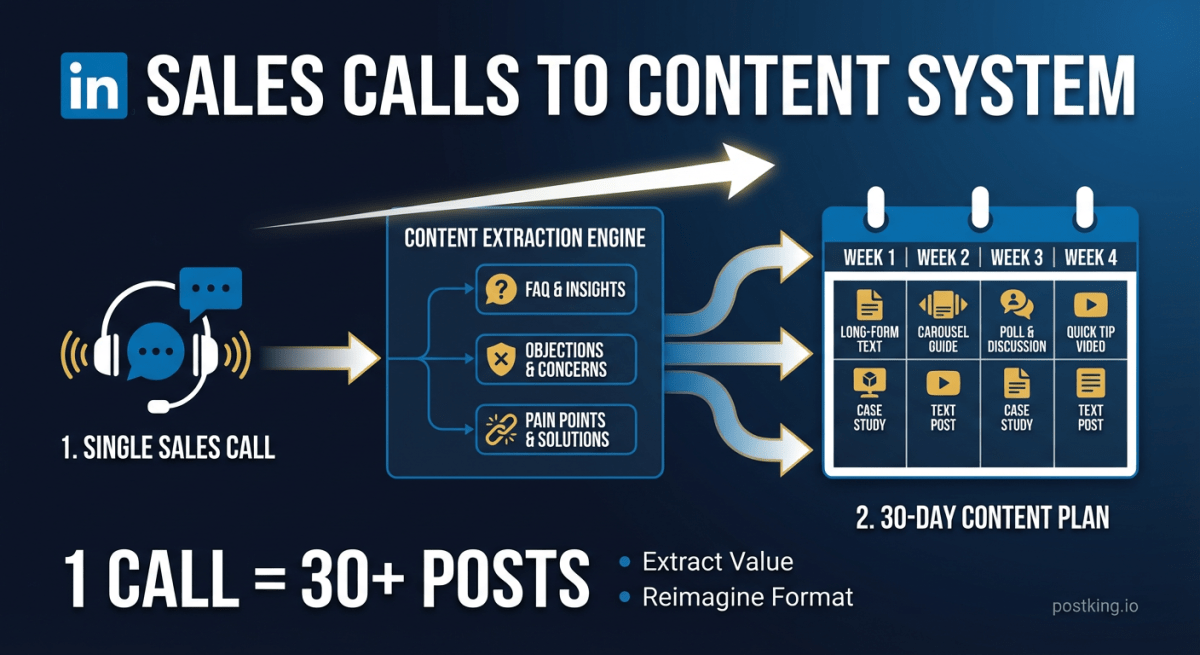
How to Turn Sales Calls into 30 Days of LinkedIn Content
Stop staring at blank screens. Your sales calls contain weeks of content hiding in plain sight. Here's the system for extracting posts from the conversations you're already having.
more engagement with carousels
Create scroll-stopping LinkedIn carousels in under 60 seconds. No design skills needed.
Try Carousel Generator