How to Get Demo Calls from LinkedIn Without Cold Outreach
Learn how to generate inbound demo requests from LinkedIn using the niche problem post format, profile optimization for conversion, and warm DM sequences that don't feel spammy.

Shanjai Raj
Founder at Postking
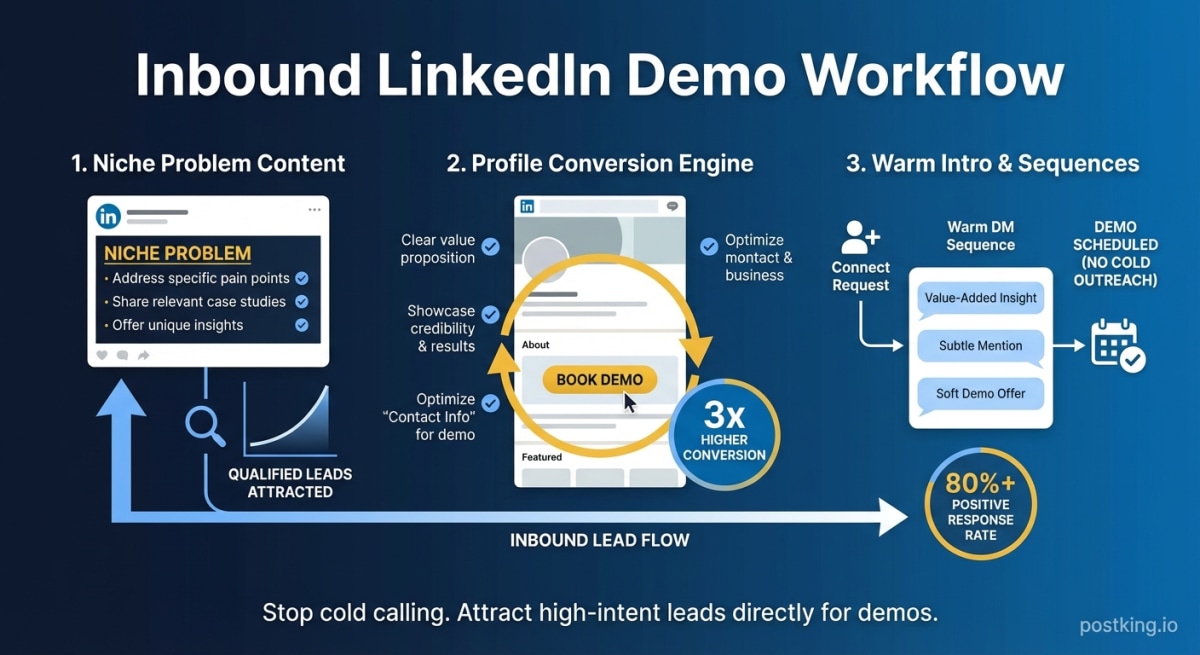
Cold outreach stopped working around 2022. Response rates dropped below 2%. Spam filters got smarter. And buyers started ignoring anything that looked like a template.
But here's what the data shows: B2B buyers are 5x more likely to engage with a seller who provides new insights about their business. They want to learn from you before you pitch them.
LinkedIn gives you a platform to do exactly that. Not through connection request spam or automated sequences, but through content that positions you as the person who understands their problem better than anyone else.
This guide covers the specific tactics that turn LinkedIn content into booked demo calls. No cold messages. No engagement pods. Just a systematic approach to attracting the right buyers to you.
Why Inbound Beats Outbound (The Math)
The economics of cold outreach are brutal for founders.
A typical cold email sequence requires 100+ personalized messages to generate a handful of replies. Even with good targeting, you're looking at 15-20 hours of work for maybe 2-3 conversations. And most of those conversations start with skepticism because you interrupted someone's day.
Inbound flips the dynamic completely.
One piece of content that resonates with your target buyer reaches hundreds or thousands of relevant people. The ones who engage are self-selecting. They raised their hand. They're already interested.
A founder who posts consistently on LinkedIn spends maybe 3-4 hours per week on content. Over a month, that's 16 hours. But each post compounds. The audience grows. The content stays discoverable. The pipeline builds itself.
The real difference is positioning. Cold outreach says "I want something from you." Inbound content says "Here's value, no strings attached." Guess which one buyers prefer?
The Niche Problem Post Format
Generic thought leadership doesn't generate pipeline. Posts about "leadership lessons" or "entrepreneurship tips" might get likes, but they don't attract buyers with specific problems you can solve.
What works is what I call the "niche problem post." It speaks directly to a specific pain your ideal customer experiences and demonstrates that you understand it deeply.
The Structure
Line 1-2: The problem statement
Open with a specific frustration your buyer faces. Not vague. Not general. Something they've complained about in meetings or lost sleep over.
Bad: "Many companies struggle with customer retention."
Good: "Your churn spiked last quarter and the board wants answers, but your data is scattered across 6 different tools."
Lines 3-7: The reality of the problem
Expand on why this problem is harder than it looks. Show that you understand the nuances. This is where you prove you're not just another vendor who read a blog post about the topic.
Lines 8-12: The insight
Share something useful. A framework. A question to ask. A metric to track. Something they can actually use whether they ever talk to you or not.
Final lines: The soft open
Don't pitch. Open a door. "If you're dealing with this, I'm curious how you're approaching it" or "Happy to share what we've seen work if helpful."
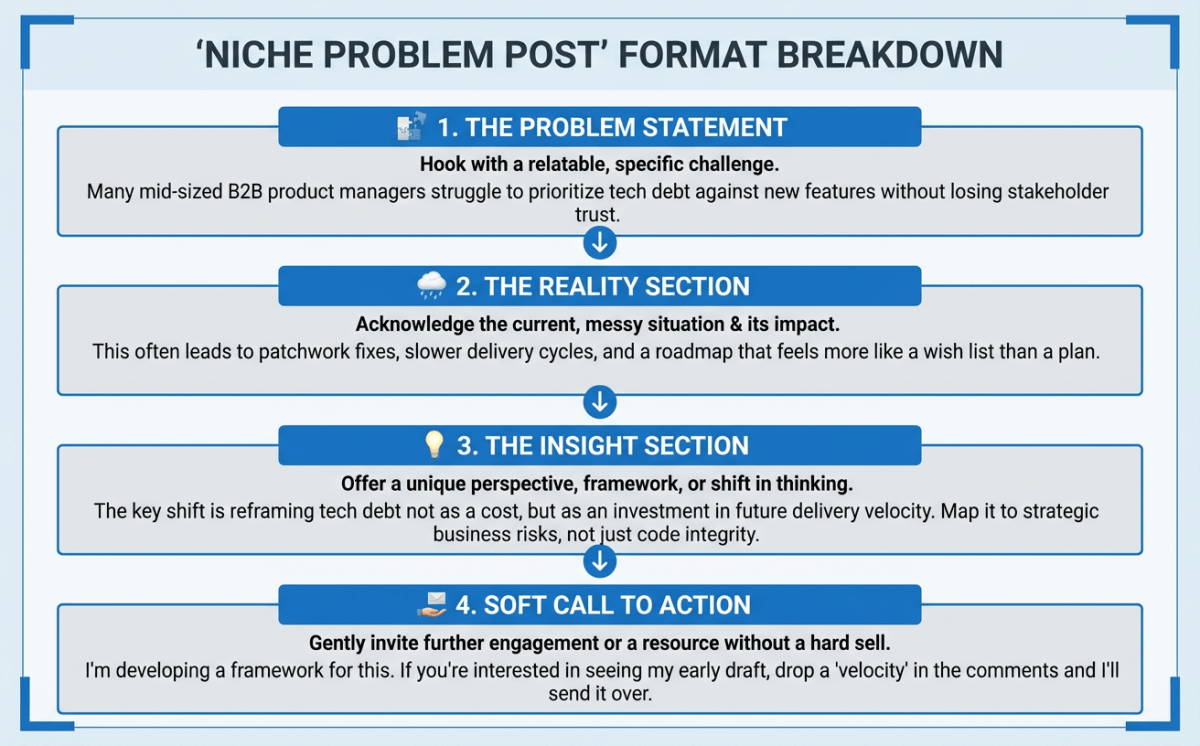 Niche Problem Post Structure
Why This Format Works
Three reasons:
Self-qualification: People who engage with a post about a specific problem are much more likely to actually have that problem. You're filtering out the noise automatically.
Credibility signal: When you articulate someone's problem better than they can, you look like an expert. They assume you must have the solution too.
Conversation starter: These posts generate comments from people sharing their own experiences. Each comment is a potential lead showing you exactly what they're struggling with.
Examples That Generate Pipeline
A founder selling procurement software might post:
You spent 3 weeks negotiating a vendor contract. Got a 15% discount. Felt good about it.
Then you found out another department signed a different contract with the same vendor at a 30% discount.
Nobody knew about the other deal. There's no system to check.
This happens at companies of every size. I've seen Fortune 500s lose millions to overlapping contracts.
The fix isn't complicated. It's just visibility.
If you're running procurement, what's your current system for catching this?
No pitch. No product mention. Just a specific problem articulated in a way that makes the right people think "that's exactly what happened to us."
For more on content frameworks that work for founders, see our complete LinkedIn guide for founders.
Profile Optimization for Conversion
Your content does the work of attracting prospects. Your profile does the work of converting them.
Most LinkedIn profiles read like resumes. They list credentials and experience. They don't answer the question prospects are actually asking: "Can this person help me with my problem?"
Featured Section as Lead Capture
The Featured section appears near the top of your profile. Most people waste it on company announcements or generic content. Instead, use it as a conversion mechanism.
What to feature:
-
A lead magnet relevant to your buyers' problem - A guide, template, or framework they can download. This captures contact information from people who are interested but not ready to talk.
-
Your best "niche problem" post - The one that generated the most comments from your target buyers. Shows new profile visitors what you're about.
-
A case study or proof point - Concrete evidence that you've solved the problem you talk about.
-
A Calendly or booking link with context - Not just "Book a call" but "15-minute chat about [specific problem]." Make it clear what they're signing up for.
Headline That Speaks to Buyers
Your headline shows up everywhere. In search results. In connection requests. In the comments section. It's prime real estate.
The default "CEO at Company Name" tells prospects nothing about whether you can help them.
Formula that converts: [Who I help] + [What outcome I deliver]
Examples:
- "Helping B2B SaaS reduce churn by 40% | Founder at RetentionCo"
- "Sales leaders: I help you close 30% more enterprise deals | CEO at DealFlow"
- "Making procurement teams look like heroes | Founder at SpendWise"
Front-load the value proposition. Your title can come second.
About Section as a Sales Page
Write your About section like copy for a landing page. First person. Benefit-focused. Clear call to action.
Structure:
Lines 1-3 (the hook, visible before "see more"): State the problem you solve in a way that makes your ideal buyer keep reading.
Next 2-3 paragraphs: Explain your approach. What makes your perspective different? Why should they trust you?
Bullet points: 3-5 specific results you've delivered. Numbers are better than claims.
Final paragraph: Clear CTA. What should an interested prospect do next?
Skip the biography. Nobody cares where you went to school unless you're selling to alumni.
CTAs That Convert Viewers to Calls
The call to action is where most LinkedIn content fails. Either there's no CTA at all, or it's so aggressive it kills the trust you just built.
The goal isn't to close a deal in a LinkedIn post. It's to start a conversation.
The Spectrum of CTAs
Lowest friction (best for awareness posts):
- "Curious if others see this differently"
- "What's your experience with this?"
- "Am I missing something here?"
These invite engagement without any commitment. Good for posts where you're establishing expertise.
Medium friction (best for problem posts):
- "If you're dealing with this, DM me what you've tried"
- "Happy to share the full framework if useful - just comment 'interested'"
- "Reply with your situation and I'll share what I've seen work"
These require a small action but offer clear value in return.
Highest friction (use sparingly):
- "If you want to see how we solve this, link in comments"
- "We're doing 5 free audits this month - DM if interested"
These are closer to pitches. Use them only after you've built significant trust through consistent valuable content.
The Comment Trigger Method
This works remarkably well: end your post asking people to comment a specific word to receive something valuable.
"Comment 'playbook' and I'll send you the framework we use"
Why it works:
- Low commitment (typing one word)
- Clear value exchange
- Creates public engagement (boosts reach)
- Gives you a warm reason to DM them
The key is actually delivering something valuable. A generic PDF won't cut it. The resource should be genuinely useful and directly relevant to the problem you discussed.
The Warm DM Sequence
Someone engaged with your content. They commented something substantive or DMed asking a question. Now what?
This is where most founders either do nothing (leaving opportunity on the table) or immediately pitch (destroying the trust they built).
The warm DM sequence is about moving from content consumer to conversation without being pushy.
Message 1: The Acknowledgment (Within 24 hours of engagement)
Don't pitch. Don't even hint at pitching. Just acknowledge their engagement and add value.
If they commented on your post:
Hey [Name] - thanks for the thoughtful comment on my post about [topic]. Your point about [specific thing they said] is interesting. We've actually seen similar patterns with [add context or insight].
If they requested something (the comment trigger method):
Hey [Name] - here's the [resource] I mentioned. Let me know if any of it applies to your situation or if you have questions.
That's it. No ask. No next step. Just value.
Message 2: The Check-In (3-5 days later, only if they responded to Message 1)
Did any of that end up being useful? Curious how it landed given what you mentioned about [their specific situation].
This invites them to share more about their context without any pressure.
Message 3: The Offer (Only after genuine conversation)
After you've exchanged a few messages and understand their situation:
Based on what you've shared about [specific problem], I think we might be able to help. We've worked with [similar company type] on exactly this and [result]. Would a quick call be useful, or would you prefer I send over some specifics first?
The offer feels natural because it's based on an actual conversation about their actual problem.
What NOT to Do
Don't automate this process. The moment your follow-up feels templated, you've lost. These messages need to reference specific things they said.
Don't pitch in Message 1. Ever. The relationship isn't there yet.
Don't follow up if they don't respond. One or two check-ins max. After that, continue engaging with their content and wait for them to come back.
Don't treat this as a funnel. These are humans. Some will become customers. Most won't. The ones who don't are still part of your network and might refer others.
For more on building genuine engagement that leads to opportunities, check out our guide on LinkedIn engagement strategies.
Measuring Content by Pipeline, Not Likes
Vanity metrics will destroy your LinkedIn strategy.
A post that gets 500 likes but generates zero conversations with your ICP is worse than a post that gets 50 likes but starts 3 conversations with decision-makers.
The Metrics That Actually Matter
Tier 1: Pipeline metrics
- Demo calls booked from LinkedIn leads
- Opportunities created from LinkedIn conversations
- Revenue influenced by LinkedIn touchpoints
These are the numbers that matter. Everything else is just a proxy.
Tier 2: Conversation metrics
- DMs received from ideal customers
- Comment conversations with ICP members
- Connection requests from target accounts
If your content is working, you should see inbound interest from the people you want to reach.
Tier 3: Leading indicators
- Profile views from target industries
- Engagement rate on problem-specific posts
- Follower growth in relevant segments
These suggest your content is reaching the right people, but they don't prove it's converting.
Setting Up Tracking
At minimum, track:
-
Source of every demo call. Ask "How did you hear about us?" and note when they say LinkedIn.
-
LinkedIn conversations to pipeline. Keep a simple spreadsheet: Name, first interaction date, how they found you, current status.
-
Content performance by conversion. Track which posts generate the most DMs and profile visits, not just likes.
The Feedback Loop
Review your metrics monthly. Look for patterns:
- Which post topics generated the most conversations with ICP?
- Which CTAs drove the most DM responses?
- What time/day correlates with higher-quality engagement?
Then do more of what works. Cut what doesn't.
This isn't complicated analysis. It's just paying attention to what's actually driving results instead of what feels good.
Putting It Together: The Weekly System
Here's a practical workflow that generates pipeline without consuming your week.
Monday (45 minutes): Content planning
- Review last week's performance
- Draft 2-3 posts for the week
- Schedule using LinkedIn's native scheduler or a tool like Postking
Tuesday and Thursday (30 minutes each): Post and engage
- Publish your scheduled post (ideally 8-10 AM in your audience's timezone)
- Spend 30 minutes responding to comments and engaging with prospects' content
- Note anyone in your ICP who engaged for follow-up
Wednesday and Friday (15 minutes): DM follow-ups
- Send acknowledgment messages to new engagers
- Check in on ongoing conversations
- Move warm conversations toward calls
Weekly total: 2-2.5 hours
That's it. You're not becoming a full-time content creator. You're systematically using content to start conversations that lead to revenue.
The Hard Truth About Patience
Inbound takes longer to start than outbound. The first month, you might book zero calls from LinkedIn. That's normal.
But outbound has a ceiling. Inbound compounds.
Month 1: Building audience, testing what resonates Month 2-3: Conversations starting, first inbound requests Month 4-6: Consistent pipeline, referrals starting Month 6+: LinkedIn becomes a significant lead source
The founders who win at this are the ones who commit to 6 months before judging results. The ones who quit after 6 weeks never see the payoff.
Your competitors are still sending cold emails. You're building an audience that comes to you.
Start this week. One niche problem post. One conversation. Build from there.
Ready to create content that converts? Postking's carousel generator helps you turn your frameworks into visual content that gets 3x more engagement. Or use our free post formatter to structure your niche problem posts for maximum readability.
Related Reads
Written by
Shanjai Raj
Founder at Postking
Building tools to help professionals grow on LinkedIn. Passionate about content strategy and personal branding.
View all postsYou might also like
LinkedIn Post Ideas Generator
Try our free linkedin post ideas generator to enhance your LinkedIn presence.
LinkedIn Post Formatter
Try our free linkedin post formatter to enhance your LinkedIn presence.
How to Get Inbound Leads on LinkedIn as a Consultant: The Authority-First Approach
Stop chasing clients. Learn how consultants build authority through content, turn engagement into natural conversations, and create a sustainable inbound lead system that works while you're serving clients.
LinkedIn Profile Optimization for Consultants: Convert Profile Views Into Discovery Calls
Learn how consultants should optimize their LinkedIn profiles differently than job seekers. Includes conversion-focused strategies for every profile section, how to showcase results without breaking confidentiality, and strategic CTA placement to turn visitors into paying clients.
LinkedIn Posting Frequency Calculator
Try our free linkedin posting frequency calculator to enhance your LinkedIn presence.
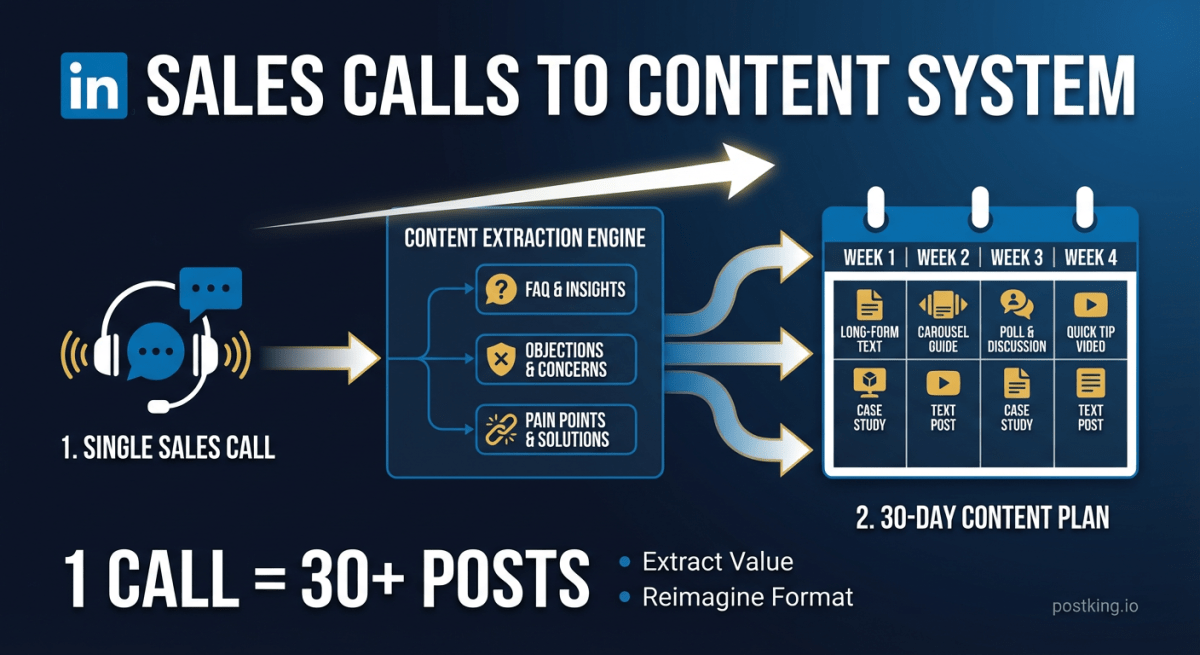
How to Turn Sales Calls into 30 Days of LinkedIn Content
Stop staring at blank screens. Your sales calls contain weeks of content hiding in plain sight. Here's the system for extracting posts from the conversations you're already having.
Does LinkedIn Generate Real Estate Leads? Honest Answer + Playbook (2026)
If LinkedIn feels like a waste of time for real estate, here is the honest answer and the exact system that turns posts into listings and referrals.
more engagement with carousels
Create scroll-stopping LinkedIn carousels in under 60 seconds. No design skills needed.
Try Carousel Generator